> ## Documentation Index
> Fetch the complete documentation index at: https://docs.zoice.com/llms.txt
> Use this file to discover all available pages before exploring further.
# Image-to-Image with Nano Banana
> Create AI images using reference photos with the Nano Banana model. Learn how to control influence strength for consistent style and composition transformations.
## Quick Start
The AI analyzes your input image and applies transformations based on your text prompt while maintaining the overall composition and structure of the original image.
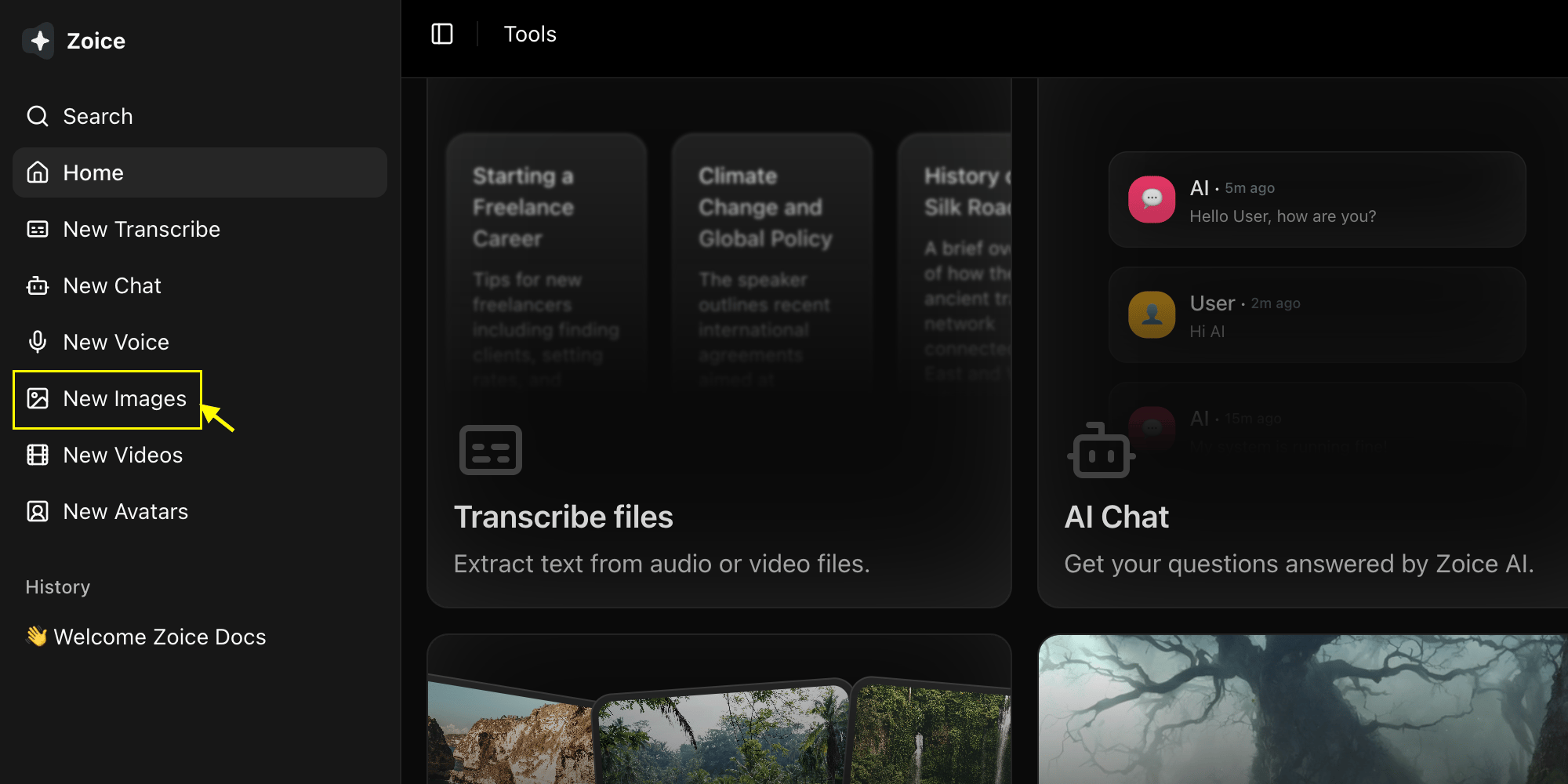
Go to the Image Generator tool by clicking on **New Image**.
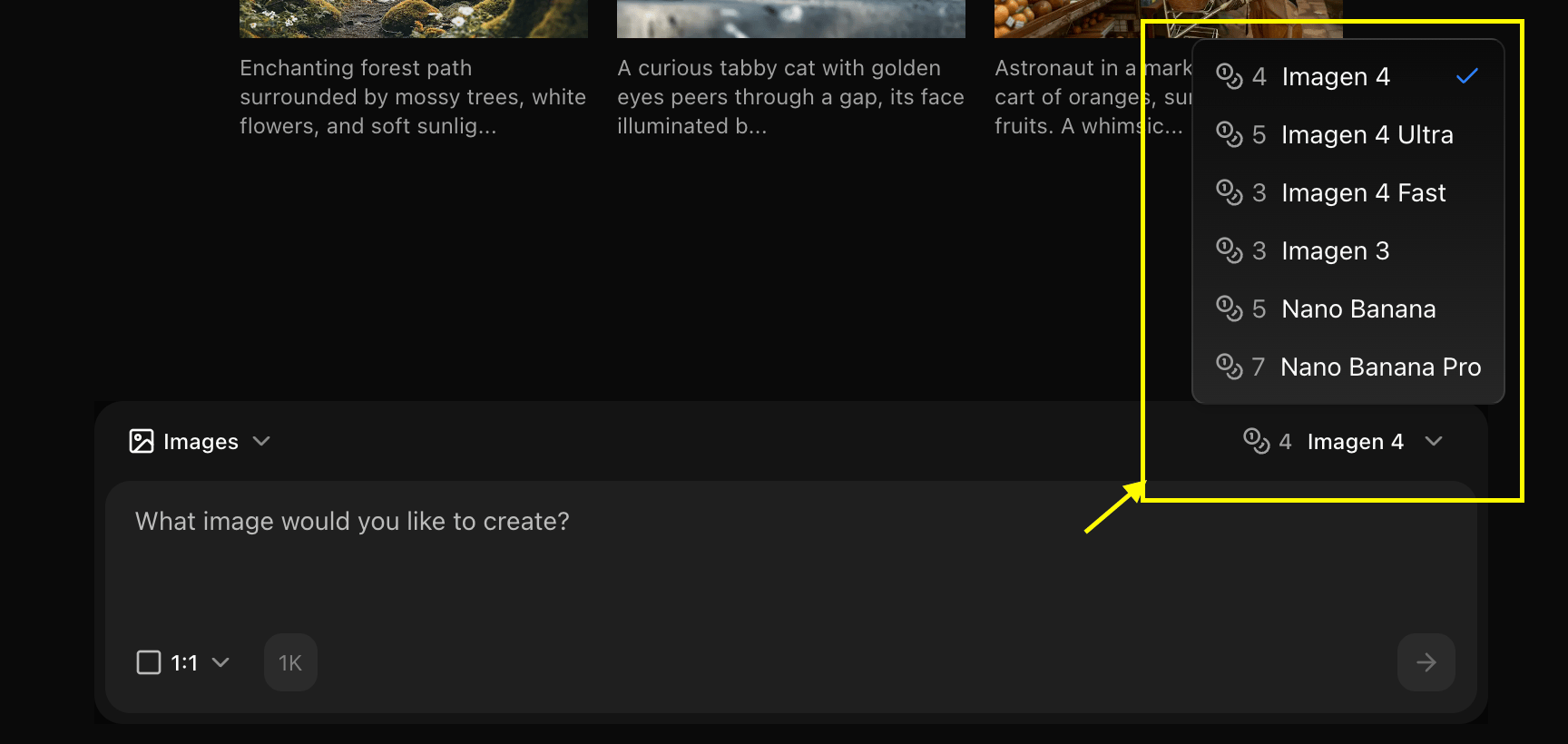
 Choose "Nano Banana" from the model selector.
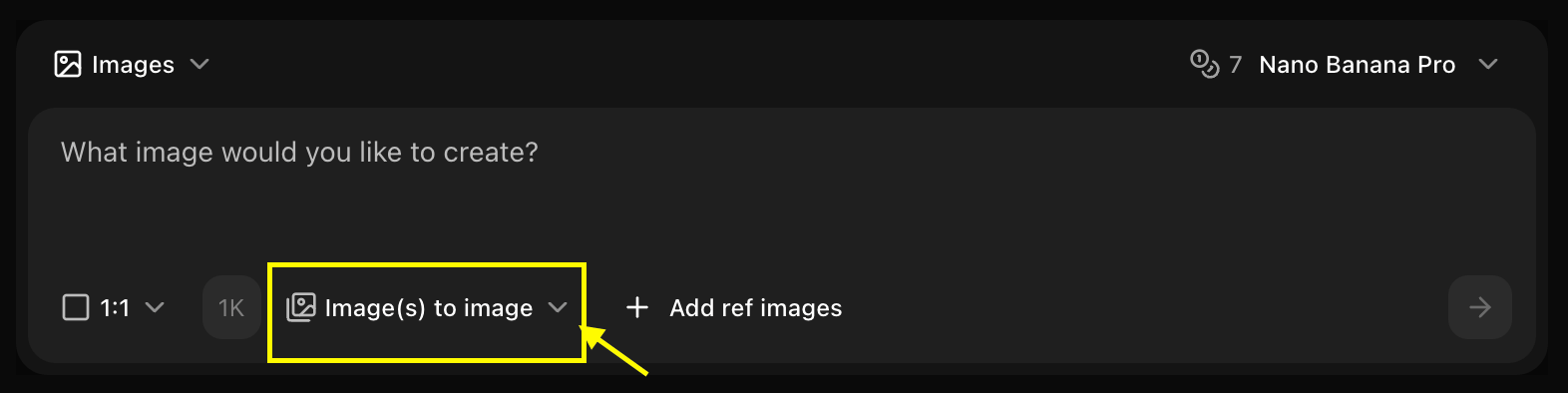
 Choose **Image to Image** mode and set your preferred resolution.
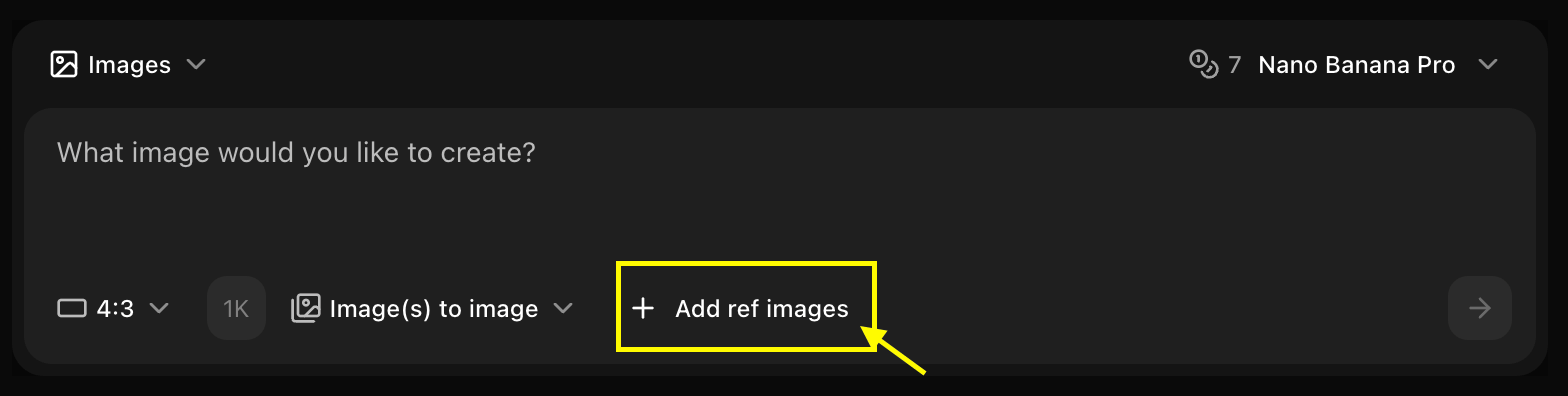
 Upload the image you want to use as a base.
 Enter a description of how you want the AI to modify your reference image.
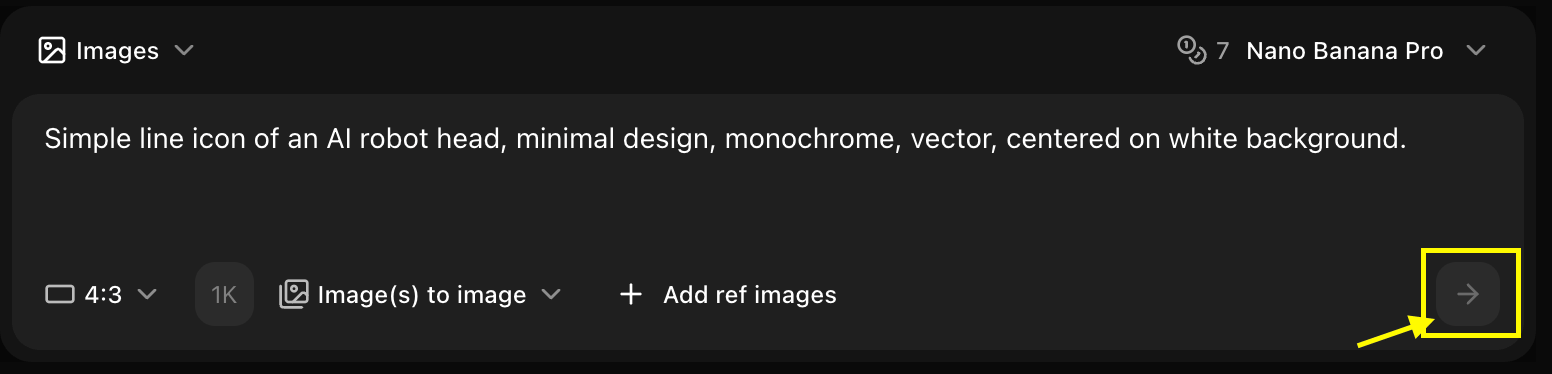
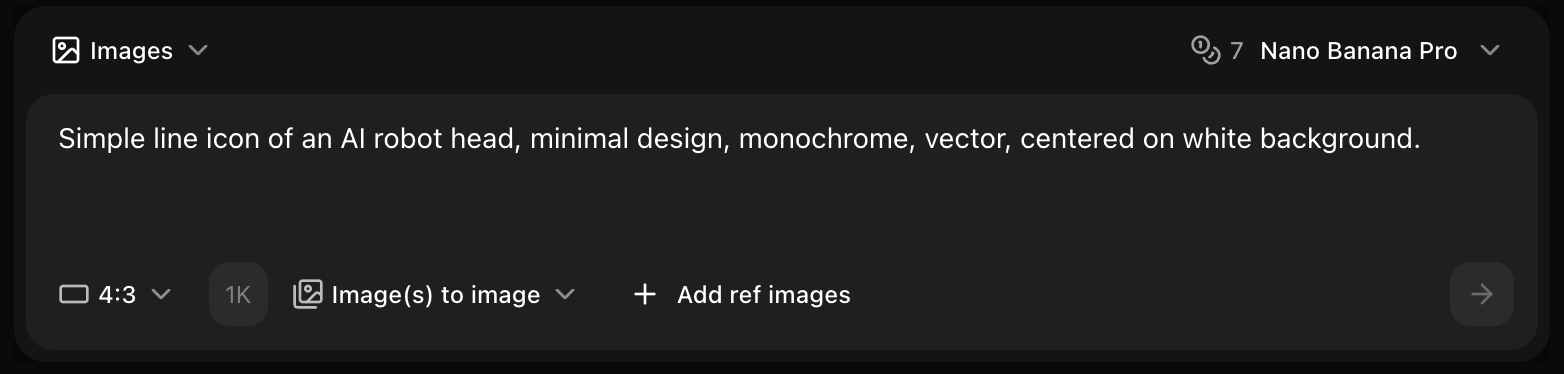 Click on **Generate** and wait a few seconds for your transformed image to be created.
 Save your generated image.
## Reference Image Requirements
### Technical Specs
* **Formats**: JPG, PNG, WebP
* **Max Size**: 10MB
* **Recommended Resolution**: 1024x1024 or higher
* **Aspect Ratio**: Any (will be adjusted to match output)
### Content Guidelines
* Clear, high-quality images work best
* Good lighting and focus
* Relevant to desired output
* Simple compositions are easier to work with
## Influence Strength
**Loose Guidance**
* General style inspiration
* Color palette reference
* Mood and atmosphere
* High creative freedom
**Best For:**
* Style inspiration only
* Color scheme guidance
* Atmospheric reference
**Balanced**
* Maintains key elements
* Follows composition
* Preserves style
* Some creative freedom
**Best For:**
* Style transfer
* Composition guidance
* Balanced results
**Strong Adherence**
* Very close to reference
* Minimal deviation
* Strict composition
* Limited variation
**Best For:**
* Image transformation
* Precise style matching
* Minimal changes
## Use Cases
### Style Transfer
Transform images to different artistic styles:
```text theme={null}
Reference: Photo of a landscape
Prompt: Transform into watercolor painting style,
soft colors, artistic brushstrokes, painterly effect
Strength: 0.6
```
### Image Enhancement
Improve or modify existing images:
```text theme={null}
Reference: Product photo
Prompt: Professional studio lighting, enhanced colors,
sharp details, clean background, high quality
Strength: 0.7
```
### Composition Guidance
Use reference for layout and composition:
```text theme={null}
Reference: Example composition
Prompt: Same composition but with [different subject],
maintain layout and style, professional quality
Strength: 0.5
```
## Best Practices
* Use high-quality reference images
* Match aspect ratio to desired output
* Choose clear, well-composed references
* Ensure reference matches your goal
* Describe desired changes clearly
* Mention what to preserve from reference
* Include style keywords
* Be specific about modifications
* Start with medium strength (0.6)
* Increase for closer matching
* Decrease for more creativity
* Test different values
## Example Workflows
### Workflow 1: Style Transfer
1. Upload photo as reference
2. Set strength to 0.6
3. Prompt: "Transform to \[art style]"
4. Generate and review
5. Adjust strength if needed
### Workflow 2: Product Variation
1. Upload product image
2. Set strength to 0.7
3. Prompt: "Same product, different color/angle"
4. Generate variations quickly
5. Compare results
### Workflow 3: Composition Template
1. Upload composition reference
2. Set strength to 0.5
3. Prompt: "Same layout, different subject"
4. Generate new content
5. Maintain consistent style
## Tips for Nano Banana
Use Nano Banana's speed to test multiple strengths quickly
Perfect for generating web graphics from references
Process multiple references efficiently
Affordable for high-volume reference-based generation
## Common Scenarios
### Social Media Consistency
```text theme={null}
Reference: Brand style example
Prompt: Create new post in same style, [new content]
Strength: 0.7
Use: Maintain brand visual consistency
```
### Product Mockups
```text theme={null}
Reference: Product in one setting
Prompt: Same product in [different setting/angle]
Strength: 0.8
Use: Generate product variations
```
### Art Style Matching
```text theme={null}
Reference: Artwork example
Prompt: Create [new subject] in this art style
Strength: 0.6
Use: Consistent artistic style
```
## Troubleshooting
* Decrease influence strength
* Make prompt more descriptive
* Add more creative elements
* Try lower strength (0.3-0.4)
* Increase influence strength
* Simplify prompt
* Use clearer reference image
* Try higher strength (0.7-0.9)
* Check reference image quality
* Adjust strength to medium (0.5-0.6)
* Clarify prompt
* Try different reference
Nano Banana's fast generation makes it ideal for quickly testing different reference strengths to find the perfect balance!
## Next Steps
Generate without reference images
Learn more about Nano Banana
Back to the main Image Generator guide
Save your generated image.
## Reference Image Requirements
### Technical Specs
* **Formats**: JPG, PNG, WebP
* **Max Size**: 10MB
* **Recommended Resolution**: 1024x1024 or higher
* **Aspect Ratio**: Any (will be adjusted to match output)
### Content Guidelines
* Clear, high-quality images work best
* Good lighting and focus
* Relevant to desired output
* Simple compositions are easier to work with
## Influence Strength
**Loose Guidance**
* General style inspiration
* Color palette reference
* Mood and atmosphere
* High creative freedom
**Best For:**
* Style inspiration only
* Color scheme guidance
* Atmospheric reference
**Balanced**
* Maintains key elements
* Follows composition
* Preserves style
* Some creative freedom
**Best For:**
* Style transfer
* Composition guidance
* Balanced results
**Strong Adherence**
* Very close to reference
* Minimal deviation
* Strict composition
* Limited variation
**Best For:**
* Image transformation
* Precise style matching
* Minimal changes
## Use Cases
### Style Transfer
Transform images to different artistic styles:
```text theme={null}
Reference: Photo of a landscape
Prompt: Transform into watercolor painting style,
soft colors, artistic brushstrokes, painterly effect
Strength: 0.6
```
### Image Enhancement
Improve or modify existing images:
```text theme={null}
Reference: Product photo
Prompt: Professional studio lighting, enhanced colors,
sharp details, clean background, high quality
Strength: 0.7
```
### Composition Guidance
Use reference for layout and composition:
```text theme={null}
Reference: Example composition
Prompt: Same composition but with [different subject],
maintain layout and style, professional quality
Strength: 0.5
```
## Best Practices
* Use high-quality reference images
* Match aspect ratio to desired output
* Choose clear, well-composed references
* Ensure reference matches your goal
* Describe desired changes clearly
* Mention what to preserve from reference
* Include style keywords
* Be specific about modifications
* Start with medium strength (0.6)
* Increase for closer matching
* Decrease for more creativity
* Test different values
## Example Workflows
### Workflow 1: Style Transfer
1. Upload photo as reference
2. Set strength to 0.6
3. Prompt: "Transform to \[art style]"
4. Generate and review
5. Adjust strength if needed
### Workflow 2: Product Variation
1. Upload product image
2. Set strength to 0.7
3. Prompt: "Same product, different color/angle"
4. Generate variations quickly
5. Compare results
### Workflow 3: Composition Template
1. Upload composition reference
2. Set strength to 0.5
3. Prompt: "Same layout, different subject"
4. Generate new content
5. Maintain consistent style
## Tips for Nano Banana
Use Nano Banana's speed to test multiple strengths quickly
Perfect for generating web graphics from references
Process multiple references efficiently
Affordable for high-volume reference-based generation
## Common Scenarios
### Social Media Consistency
```text theme={null}
Reference: Brand style example
Prompt: Create new post in same style, [new content]
Strength: 0.7
Use: Maintain brand visual consistency
```
### Product Mockups
```text theme={null}
Reference: Product in one setting
Prompt: Same product in [different setting/angle]
Strength: 0.8
Use: Generate product variations
```
### Art Style Matching
```text theme={null}
Reference: Artwork example
Prompt: Create [new subject] in this art style
Strength: 0.6
Use: Consistent artistic style
```
## Troubleshooting
* Decrease influence strength
* Make prompt more descriptive
* Add more creative elements
* Try lower strength (0.3-0.4)
* Increase influence strength
* Simplify prompt
* Use clearer reference image
* Try higher strength (0.7-0.9)
* Check reference image quality
* Adjust strength to medium (0.5-0.6)
* Clarify prompt
* Try different reference
Nano Banana's fast generation makes it ideal for quickly testing different reference strengths to find the perfect balance!
## Next Steps
Generate without reference images
Learn more about Nano Banana
Back to the main Image Generator guide