> ## Documentation Index
> Fetch the complete documentation index at: https://docs.zoice.com/llms.txt
> Use this file to discover all available pages before exploring further.
# Generate Images with Nano Banana
> Master the art of generating high-quality AI images using Nano Banana's text-to-image capabilities. Includes prompt templates, settings, and best practices.
## Quick Start
Nano Banana is a fast and reliable AI image generation model for quick, high-quality creations. This guide shows you how to leverage its advanced capabilities for print-ready, ultra-detailed images.
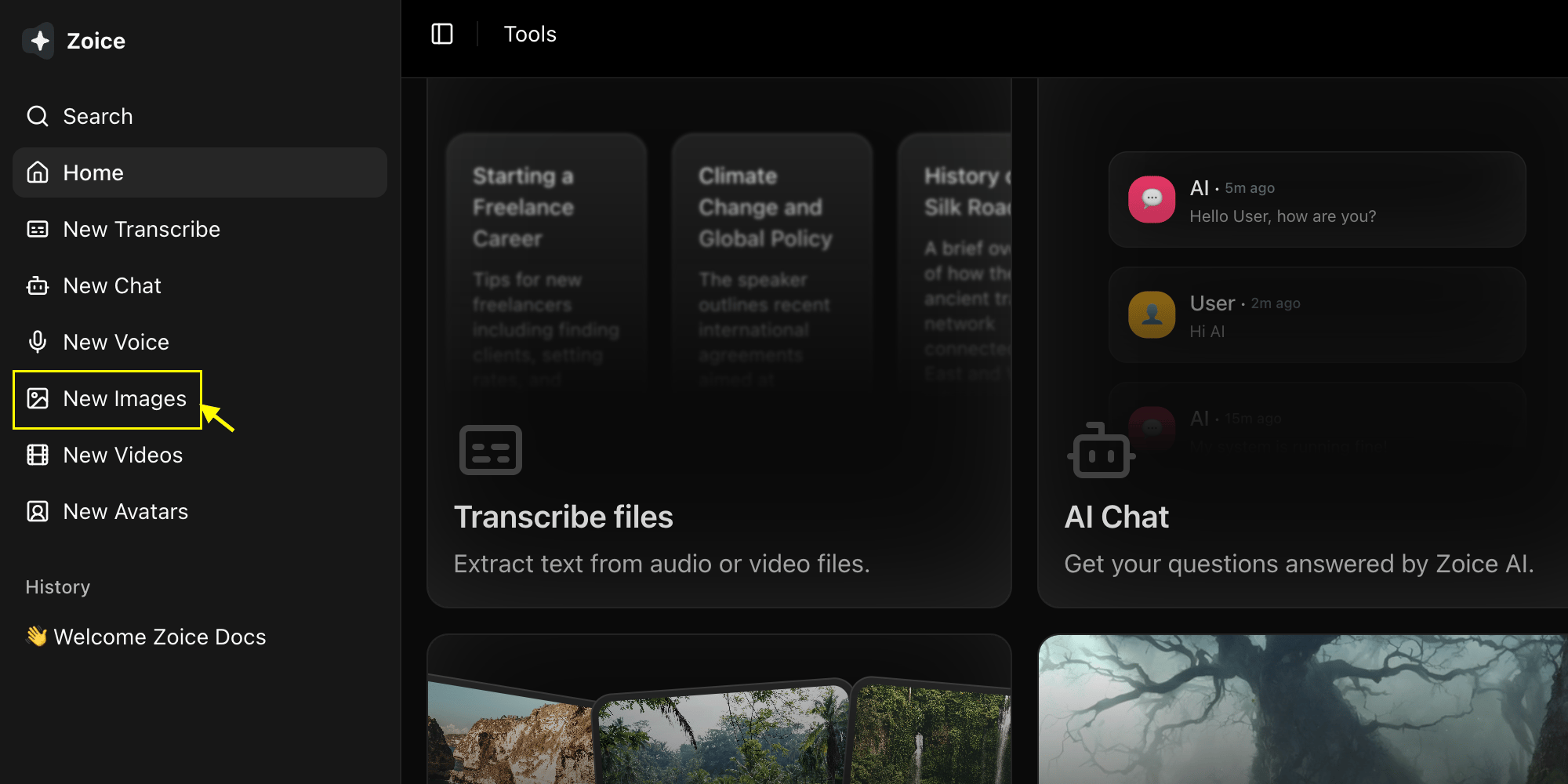
Go to the Image Generator tool in your Zoice dashboard by clicking on New Image.
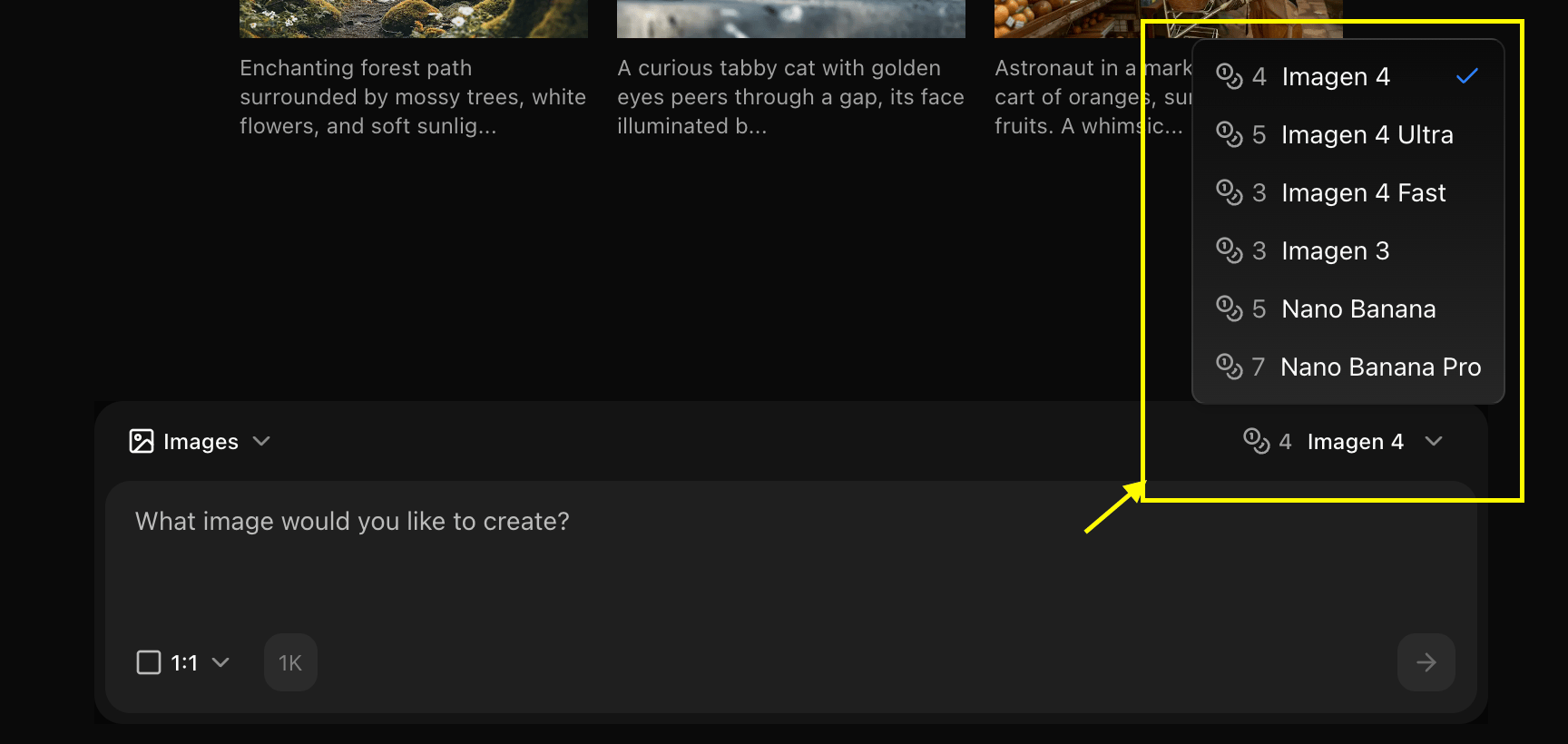
 Choose "Nano Banana" from the model selector.
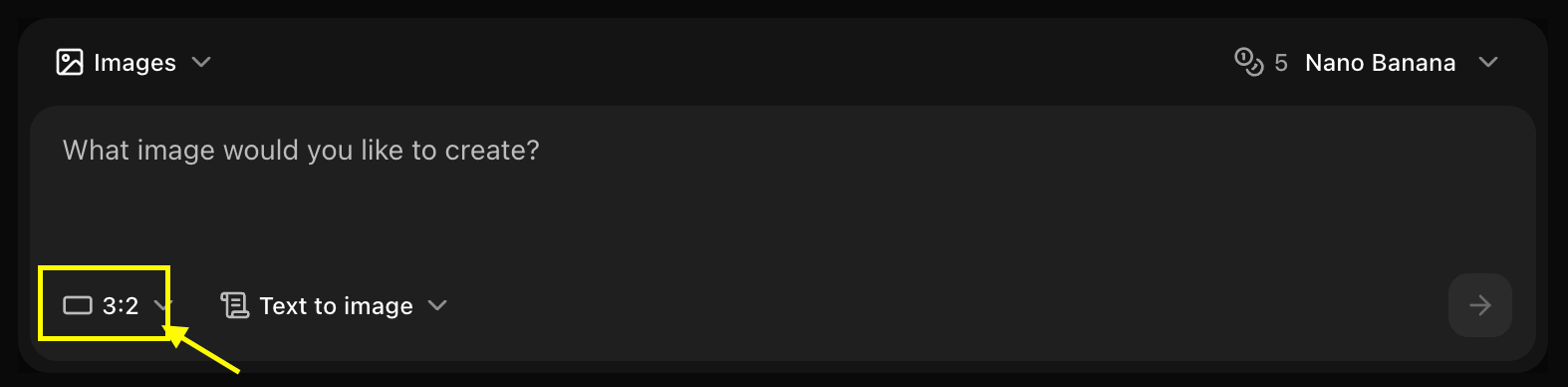
 Set resolution for the image you want to generate.
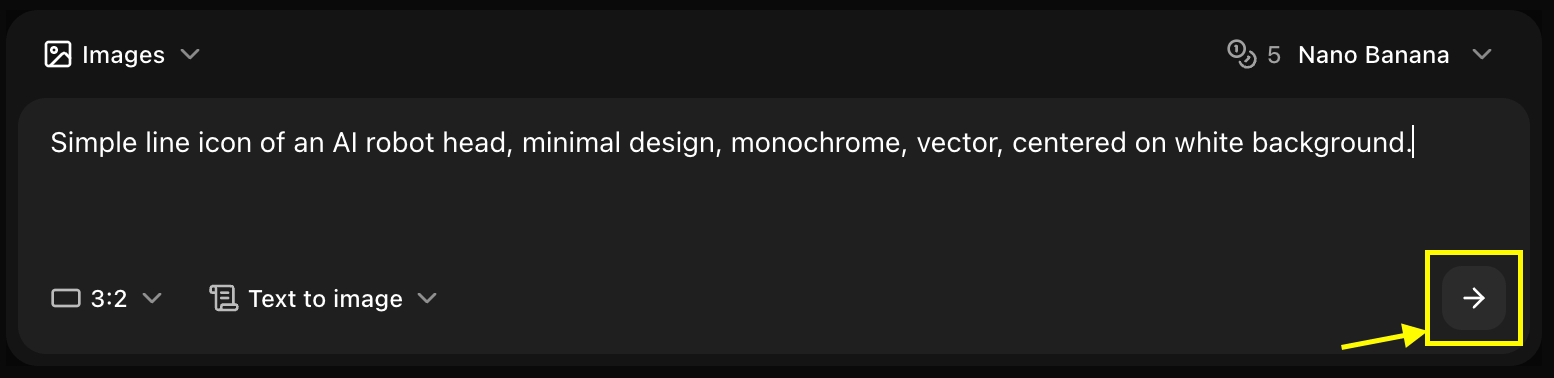
 Enter a description of the image you want to create in the prompt box.
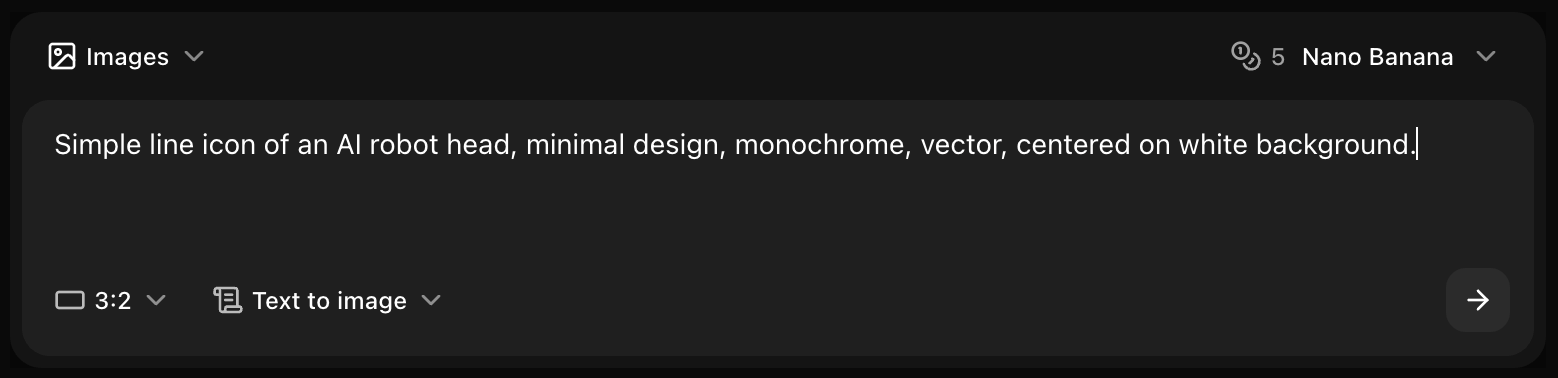 Click generate and wait few seconds for your image to be generated.
 Save your generated image
## Prompt Writing for Nano Banana
### Optimal Prompt Structure
Nano Banana works best with clear, structured prompts:
```text theme={null}
[Subject] + [Style] + [Details] + [Quality Keywords]
```
### Example Prompts
```text Photography theme={null}
A professional product photo of a smartwatch on a marble surface,
soft studio lighting, clean composition, sharp focus, high quality,
detailed, 4K
```
```text Illustration theme={null}
A cute cartoon cat sitting on a windowsill, pastel colors,
soft shading, children's book illustration style, whimsical,
charming, detailed
```
```text Landscape theme={null}
A serene mountain lake at sunset, reflection in water,
dramatic clouds, vibrant colors, nature photography,
high detail, beautiful composition
```
```text Abstract theme={null}
Abstract geometric shapes in blue and gold, modern art style,
clean lines, minimalist, professional, high contrast,
digital art, crisp
```
## Model-Specific Tips
### Leverage Speed
* Generate multiple variations quickly
* Test different prompt variations
* Iterate rapidly to find best results
* Use for A/B testing concepts
### Optimize for Web
* 1024x1024 is the sweet spot
* Perfect for social media
* Fast loading times
* Good quality-to-size ratio
### Keep Prompts Focused
* Nano Banana excels with clear, focused prompts
* Avoid overly complex scenes
* Stick to 2-3 main elements
* Be specific about style
## Parameters
### Resolution Options
* **512x512**: Ultra-fast, testing
* **1024x1024**: Standard, recommended
* **1536x1536**: High quality
* **2048x2048**: Maximum quality
### Aspect Ratios
* **1:1 (Square)**: Social media, profile images
* **16:9 (Landscape)**: Web headers, YouTube thumbnails
* **9:16 (Portrait)**: Instagram Stories, mobile
* **4:3 (Standard)**: Presentations, general use
### Advanced Settings
* **Guidance Scale**: 7-12 (recommended: 9)
* **Steps**: 20-30 (recommended: 25)
* **Seed**: Random or fixed for consistency
## Style Keywords
### Photography Styles
```text theme={null}
- Professional photography
- Studio lighting
- Natural light
- Bokeh background
- Shallow depth of field
- Sharp focus
- High resolution
```
### Artistic Styles
```text theme={null}
- Digital art
- Watercolor painting
- Oil painting
- Pencil sketch
- Vector illustration
- Cartoon style
- Anime style
```
### Quality Enhancers
```text theme={null}
- High quality
- Detailed
- Sharp
- Crisp
- 4K
- Professional
- Clean
```
## Best Practices
* Begin with basic prompts
* Add details gradually
* Test core concept first
* Refine based on results
* Always include "high quality" or "detailed"
* Add "sharp focus" for clarity
* Use "professional" for polished look
* Include resolution hints like "4K"
* Mention artistic style explicitly
* Reference photography types
* Describe lighting conditions
* Include mood descriptors
* Generate multiple versions
* Tweak one element at a time
* Save successful prompts
* Build a prompt library
## Common Use Cases
### Social Media Graphics
```text theme={null}
Prompt: Modern minimalist Instagram post design, pastel pink
and blue gradient background, clean typography space,
professional, trendy, high quality
Settings:
- Resolution: 1024x1024
- Aspect Ratio: 1:1
- Guidance: 9
```
### Blog Headers
```text theme={null}
Prompt: Abstract technology background, flowing blue and purple
digital waves, modern, professional, clean, high quality,
suitable for tech blog header
Settings:
- Resolution: 2048x1024
- Aspect Ratio: 16:9
- Guidance: 10
```
### Product Mockups
```text theme={null}
Prompt: Minimalist product photography setup, white marble
surface, soft shadows, studio lighting, clean background,
professional, high quality, detailed
Settings:
- Resolution: 1536x1536
- Aspect Ratio: 1:1
- Guidance: 11
```
## Troubleshooting
* Add "detailed" and "high quality" to prompt
* Increase resolution
* Raise guidance scale slightly
* Be more specific in description
* Make style keywords more prominent
* Put style at beginning of prompt
* Use specific style references
* Try different style keywords
* Simplify prompt
* Remove ambiguous descriptions
* Be more explicit
* Lower guidance scale
Nano Banana's speed makes it perfect for experimentation. Don't hesitate to generate multiple variations to find the perfect result!
## Prompt Templates
### Template: Product Photo
```text theme={null}
A [product type] on [surface/background], [lighting type],
[composition style], professional product photography,
high quality, detailed, sharp focus
```
### Template: Landscape
```text theme={null}
A [scene description] during [time of day], [weather/atmosphere],
[color palette], [photography style], beautiful composition,
high detail, professional
```
### Template: Portrait
```text theme={null}
[Subject description], [clothing/style], [expression/pose],
[lighting type], [background], professional portrait photography,
high quality, detailed, sharp focus
```
### Template: Abstract
```text theme={null}
Abstract [theme] with [colors], [style], [mood], modern art,
clean composition, high quality, professional, detailed
```
## Next Steps
Generate with image references
Learn more about Nano Banana
Back to the main Image Generator guide
Save your generated image
## Prompt Writing for Nano Banana
### Optimal Prompt Structure
Nano Banana works best with clear, structured prompts:
```text theme={null}
[Subject] + [Style] + [Details] + [Quality Keywords]
```
### Example Prompts
```text Photography theme={null}
A professional product photo of a smartwatch on a marble surface,
soft studio lighting, clean composition, sharp focus, high quality,
detailed, 4K
```
```text Illustration theme={null}
A cute cartoon cat sitting on a windowsill, pastel colors,
soft shading, children's book illustration style, whimsical,
charming, detailed
```
```text Landscape theme={null}
A serene mountain lake at sunset, reflection in water,
dramatic clouds, vibrant colors, nature photography,
high detail, beautiful composition
```
```text Abstract theme={null}
Abstract geometric shapes in blue and gold, modern art style,
clean lines, minimalist, professional, high contrast,
digital art, crisp
```
## Model-Specific Tips
### Leverage Speed
* Generate multiple variations quickly
* Test different prompt variations
* Iterate rapidly to find best results
* Use for A/B testing concepts
### Optimize for Web
* 1024x1024 is the sweet spot
* Perfect for social media
* Fast loading times
* Good quality-to-size ratio
### Keep Prompts Focused
* Nano Banana excels with clear, focused prompts
* Avoid overly complex scenes
* Stick to 2-3 main elements
* Be specific about style
## Parameters
### Resolution Options
* **512x512**: Ultra-fast, testing
* **1024x1024**: Standard, recommended
* **1536x1536**: High quality
* **2048x2048**: Maximum quality
### Aspect Ratios
* **1:1 (Square)**: Social media, profile images
* **16:9 (Landscape)**: Web headers, YouTube thumbnails
* **9:16 (Portrait)**: Instagram Stories, mobile
* **4:3 (Standard)**: Presentations, general use
### Advanced Settings
* **Guidance Scale**: 7-12 (recommended: 9)
* **Steps**: 20-30 (recommended: 25)
* **Seed**: Random or fixed for consistency
## Style Keywords
### Photography Styles
```text theme={null}
- Professional photography
- Studio lighting
- Natural light
- Bokeh background
- Shallow depth of field
- Sharp focus
- High resolution
```
### Artistic Styles
```text theme={null}
- Digital art
- Watercolor painting
- Oil painting
- Pencil sketch
- Vector illustration
- Cartoon style
- Anime style
```
### Quality Enhancers
```text theme={null}
- High quality
- Detailed
- Sharp
- Crisp
- 4K
- Professional
- Clean
```
## Best Practices
* Begin with basic prompts
* Add details gradually
* Test core concept first
* Refine based on results
* Always include "high quality" or "detailed"
* Add "sharp focus" for clarity
* Use "professional" for polished look
* Include resolution hints like "4K"
* Mention artistic style explicitly
* Reference photography types
* Describe lighting conditions
* Include mood descriptors
* Generate multiple versions
* Tweak one element at a time
* Save successful prompts
* Build a prompt library
## Common Use Cases
### Social Media Graphics
```text theme={null}
Prompt: Modern minimalist Instagram post design, pastel pink
and blue gradient background, clean typography space,
professional, trendy, high quality
Settings:
- Resolution: 1024x1024
- Aspect Ratio: 1:1
- Guidance: 9
```
### Blog Headers
```text theme={null}
Prompt: Abstract technology background, flowing blue and purple
digital waves, modern, professional, clean, high quality,
suitable for tech blog header
Settings:
- Resolution: 2048x1024
- Aspect Ratio: 16:9
- Guidance: 10
```
### Product Mockups
```text theme={null}
Prompt: Minimalist product photography setup, white marble
surface, soft shadows, studio lighting, clean background,
professional, high quality, detailed
Settings:
- Resolution: 1536x1536
- Aspect Ratio: 1:1
- Guidance: 11
```
## Troubleshooting
* Add "detailed" and "high quality" to prompt
* Increase resolution
* Raise guidance scale slightly
* Be more specific in description
* Make style keywords more prominent
* Put style at beginning of prompt
* Use specific style references
* Try different style keywords
* Simplify prompt
* Remove ambiguous descriptions
* Be more explicit
* Lower guidance scale
Nano Banana's speed makes it perfect for experimentation. Don't hesitate to generate multiple variations to find the perfect result!
## Prompt Templates
### Template: Product Photo
```text theme={null}
A [product type] on [surface/background], [lighting type],
[composition style], professional product photography,
high quality, detailed, sharp focus
```
### Template: Landscape
```text theme={null}
A [scene description] during [time of day], [weather/atmosphere],
[color palette], [photography style], beautiful composition,
high detail, professional
```
### Template: Portrait
```text theme={null}
[Subject description], [clothing/style], [expression/pose],
[lighting type], [background], professional portrait photography,
high quality, detailed, sharp focus
```
### Template: Abstract
```text theme={null}
Abstract [theme] with [colors], [style], [mood], modern art,
clean composition, high quality, professional, detailed
```
## Next Steps
Generate with image references
Learn more about Nano Banana
Back to the main Image Generator guide