> ## Documentation Index
> Fetch the complete documentation index at: https://docs.zoice.com/llms.txt
> Use this file to discover all available pages before exploring further.
# How to Make AI Birthday Song Video with Photo
> Learn how to make AI birthday song video with photo using Zoice. Create a personalized animated birthday video from any photo, upload your birthday song, and generate natural lip-synced greetings in minutes.
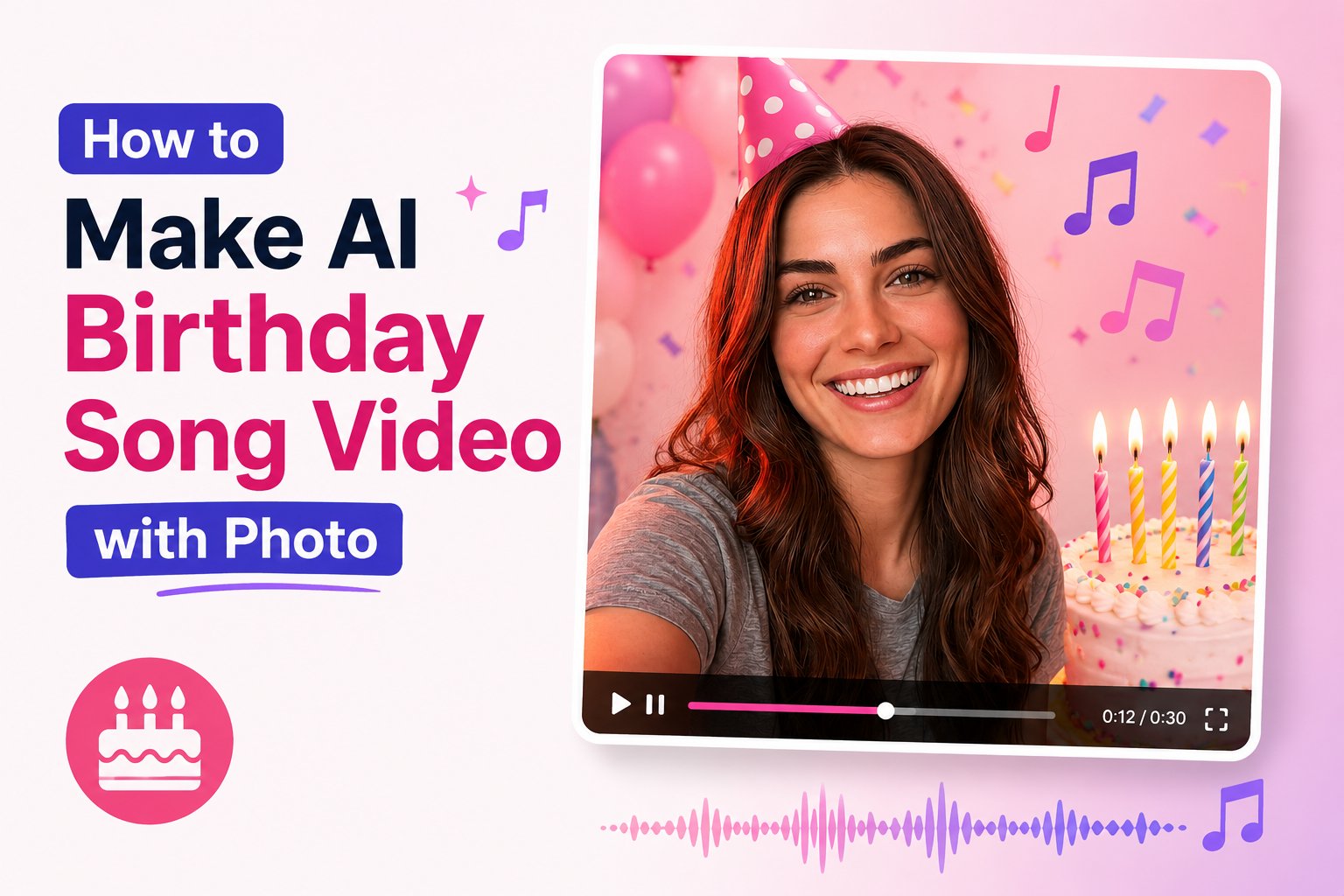 Personalized birthday cards have gone digital, and artificial intelligence now makes it possible to generate hilarious and touching greetings in seconds. If you want to surprise a loved one, you can make ai birthday song video with photo to create a memorable gift that stands out from standard text messages.
By using Zoice, you can upload any picture of a friend, relative, or coworker, pair it with a birthday song track, and instantly render a realistic singing video. The AI matches the vocals to the facial structure of the photo, generating accurate mouth movements, happy expressions, and energetic head bobbing.
This guide will show you exactly how to make ai birthday song video with photo using our online platform.
## What is an AI Birthday Video Card?
An AI birthday video card is a customized animation where a static portrait is brought to life using vocal audio. Rather than requiring expensive video editing, the AI program processes the audio waves and maps them onto the subject's lips, jawline, and facial muscles.
The person in the photo appears to sing or speak the birthday greeting naturally, making it a perfect surprise to share on messaging apps and social media feeds.
## How to Make AI Birthday Song Video with Photo
Follow these detailed steps to compile and render your personalized birthday greeting.
### Step 1: Open the Zoice Platform
Visit the main website at [Zoice.com](https://zoice.com) to access the AI generation dashboard.
Personalized birthday cards have gone digital, and artificial intelligence now makes it possible to generate hilarious and touching greetings in seconds. If you want to surprise a loved one, you can make ai birthday song video with photo to create a memorable gift that stands out from standard text messages.
By using Zoice, you can upload any picture of a friend, relative, or coworker, pair it with a birthday song track, and instantly render a realistic singing video. The AI matches the vocals to the facial structure of the photo, generating accurate mouth movements, happy expressions, and energetic head bobbing.
This guide will show you exactly how to make ai birthday song video with photo using our online platform.
## What is an AI Birthday Video Card?
An AI birthday video card is a customized animation where a static portrait is brought to life using vocal audio. Rather than requiring expensive video editing, the AI program processes the audio waves and maps them onto the subject's lips, jawline, and facial muscles.
The person in the photo appears to sing or speak the birthday greeting naturally, making it a perfect surprise to share on messaging apps and social media feeds.
## How to Make AI Birthday Song Video with Photo
Follow these detailed steps to compile and render your personalized birthday greeting.
### Step 1: Open the Zoice Platform
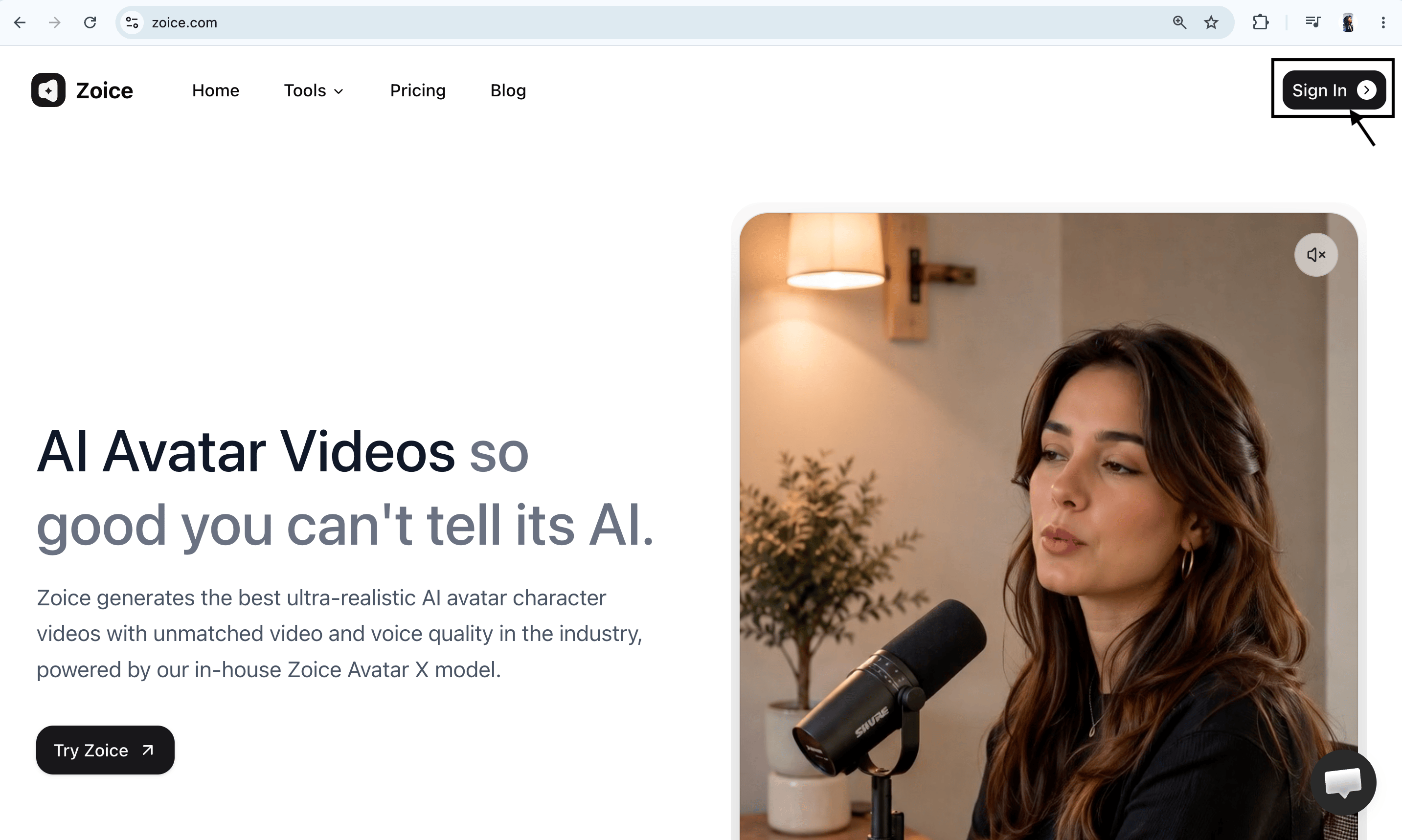
Visit the main website at [Zoice.com](https://zoice.com) to access the AI generation dashboard.
 ### Step 2: Sign In to Your Dashboard
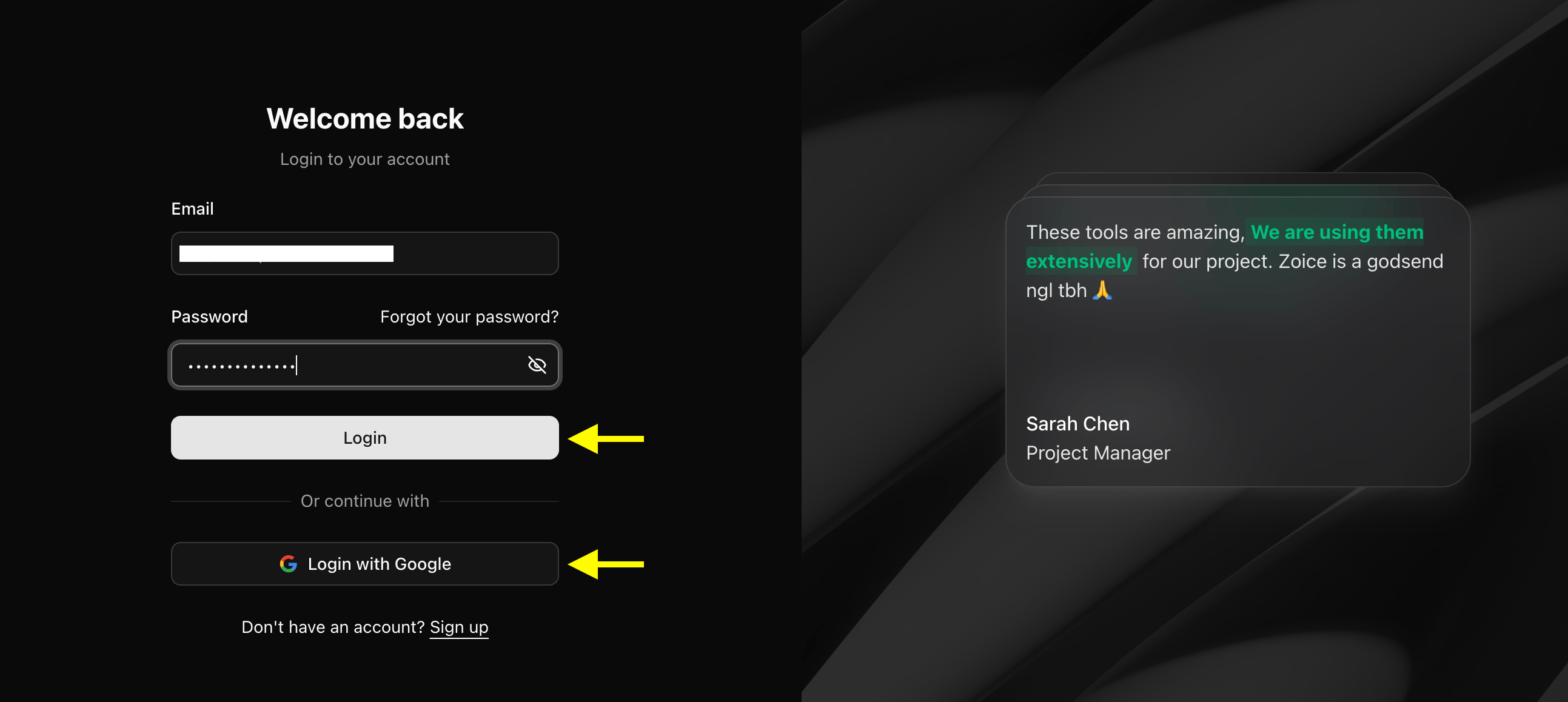
Click the **Sign In** button at the top of the screen. Log in using your email and password, or authenticate instantly using your Google profile.
### Step 2: Sign In to Your Dashboard
Click the **Sign In** button at the top of the screen. Log in using your email and password, or authenticate instantly using your Google profile.
 ### Step 3: Create a New Profile (For New Users)
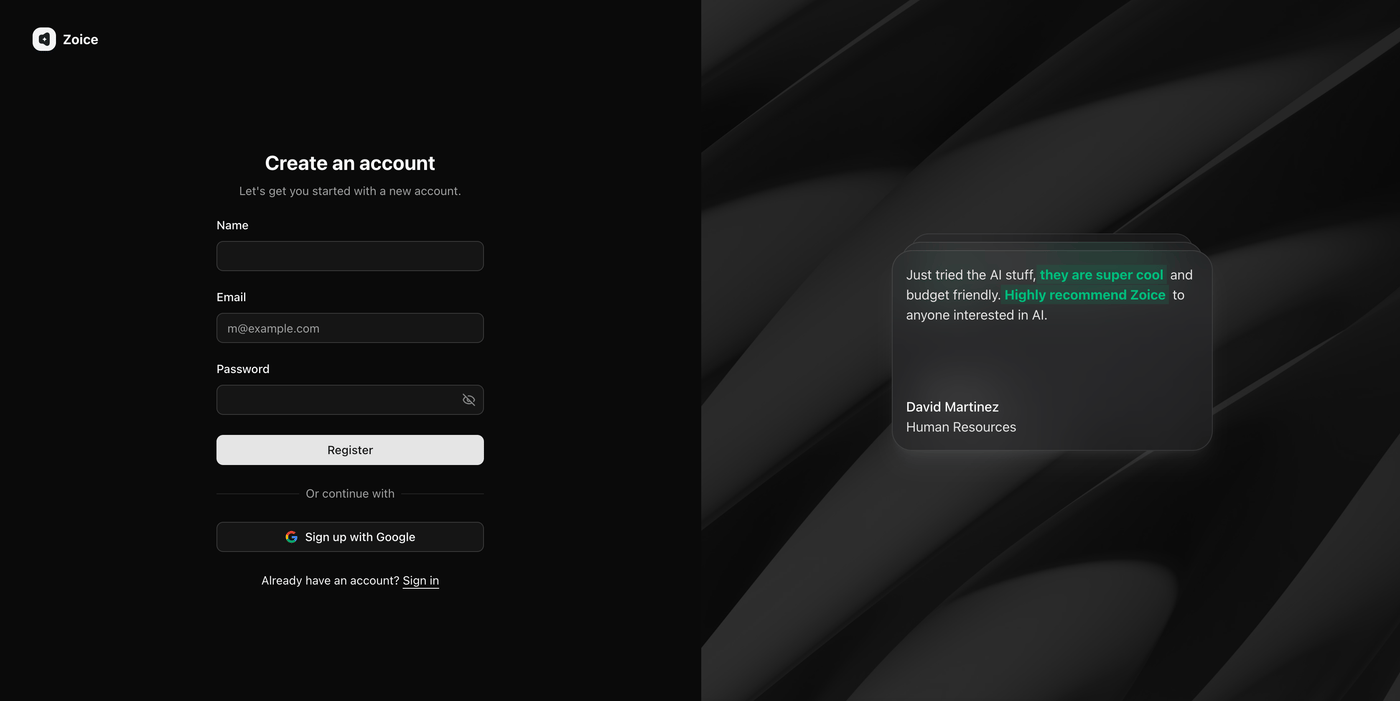
If you are a first-time visitor, select **Sign Up** to create your free account. Fill in your name, email, and password to initialize your workspace.
### Step 3: Create a New Profile (For New Users)
If you are a first-time visitor, select **Sign Up** to create your free account. Fill in your name, email, and password to initialize your workspace.
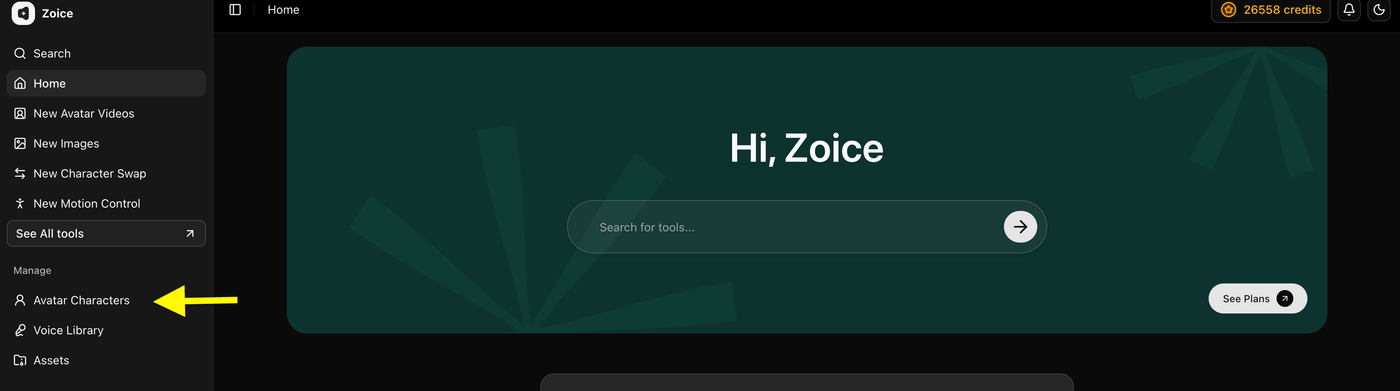
 ### Step 4: Open the Avatar Library
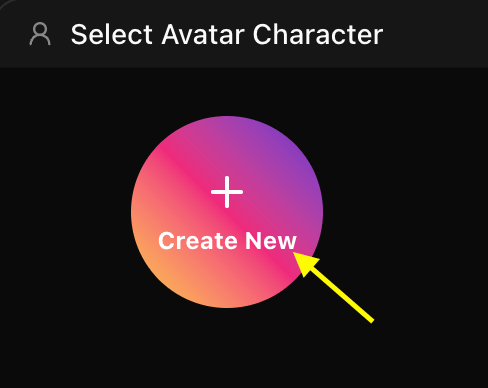
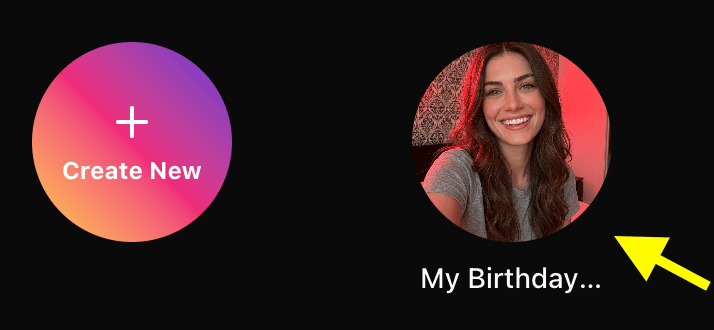
From your dashboard, click on **Avatar Characters**. Choose an existing presenter card from your collection, or click **Create New** to upload a new birthday image.
### Step 4: Open the Avatar Library
From your dashboard, click on **Avatar Characters**. Choose an existing presenter card from your collection, or click **Create New** to upload a new birthday image.
 * **Click on Create New**
 ### Step 5: Upload the Celebrant's Photo
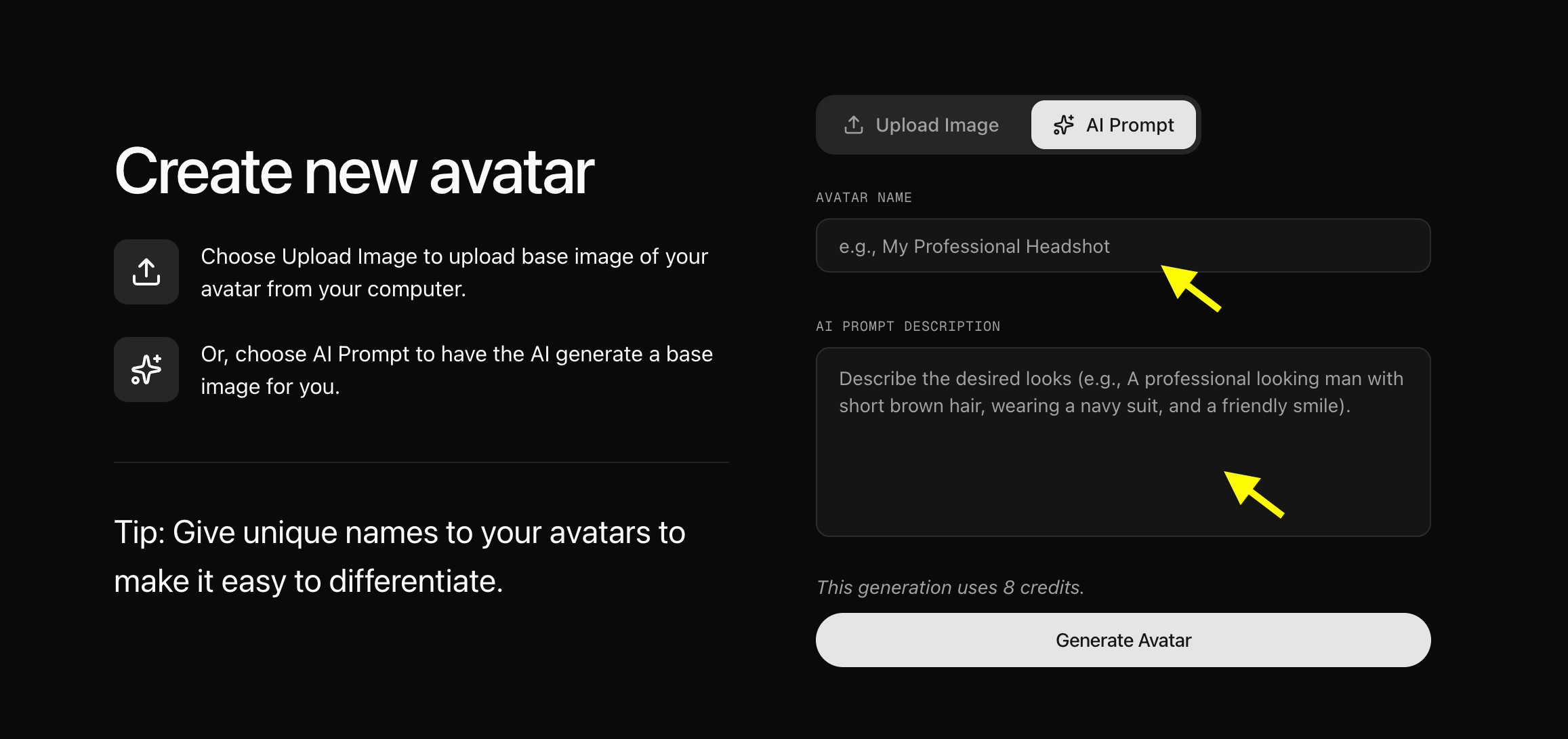
Select **Upload a Photo** and select the picture of the birthday person from your local directory. Name the character (e.g., "Birthday Boy John").
### Step 5: Upload the Celebrant's Photo
Select **Upload a Photo** and select the picture of the birthday person from your local directory. Name the character (e.g., "Birthday Boy John").
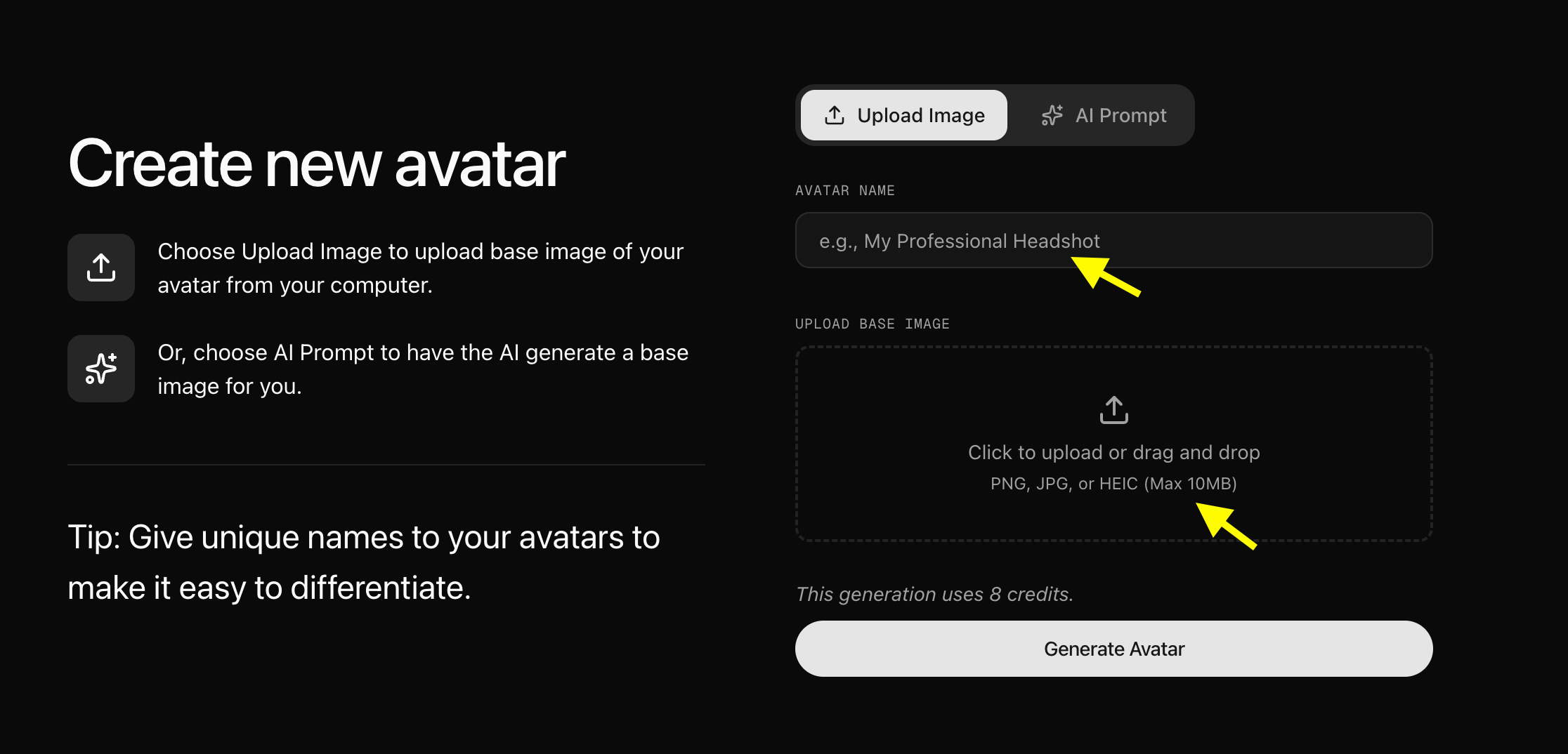 Ensure the photo is clear and has a front-facing view of the person's face. We uploaded this sample image:
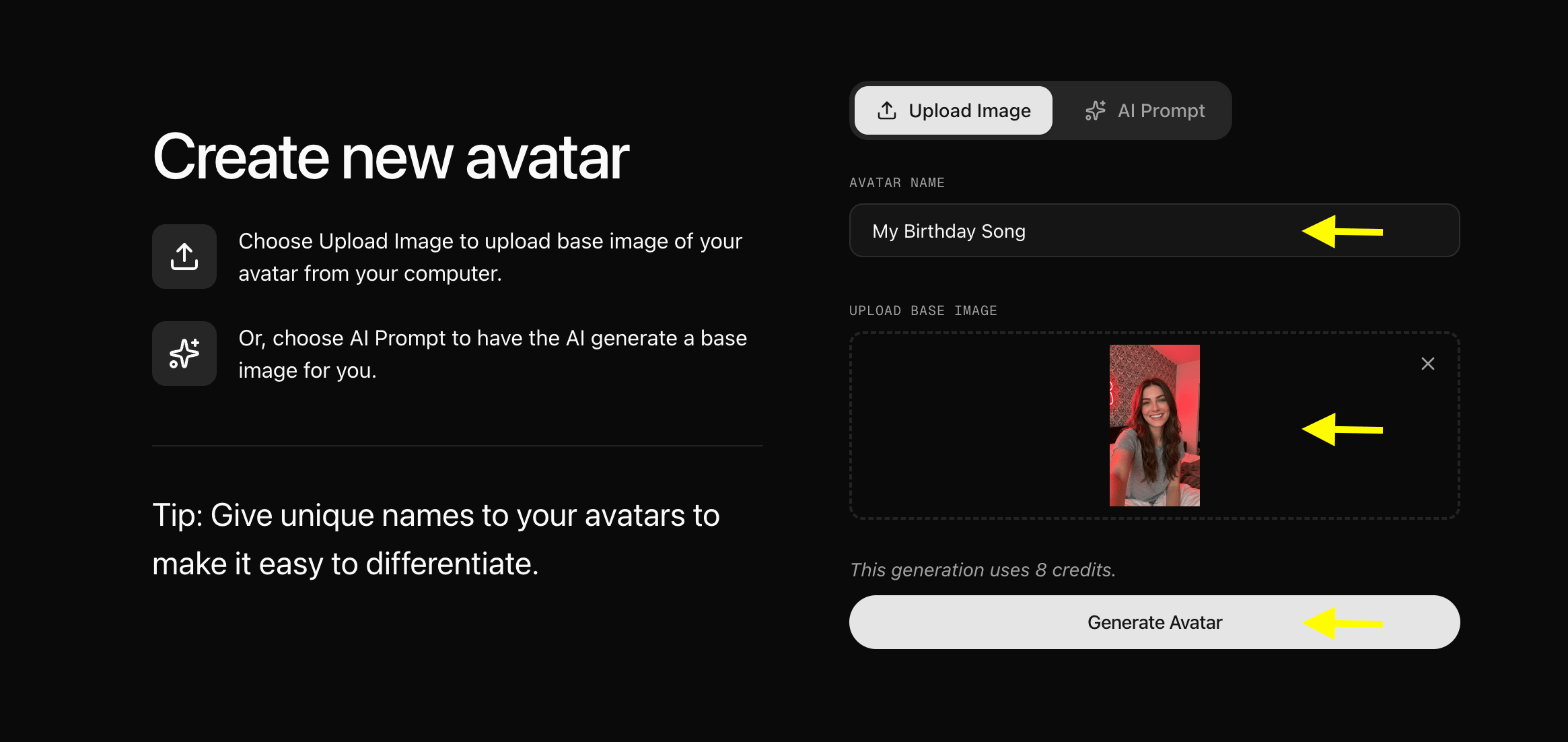 Once uploaded, the character card will be saved to your dashboard library:
 *Note: You can also generate a custom party character using the **AI Prompt** toggle by writing descriptive text (e.g., "A happy cartoon mascot wearing a party hat, 3D style").*
 ### Step 6: Configure Profile Details
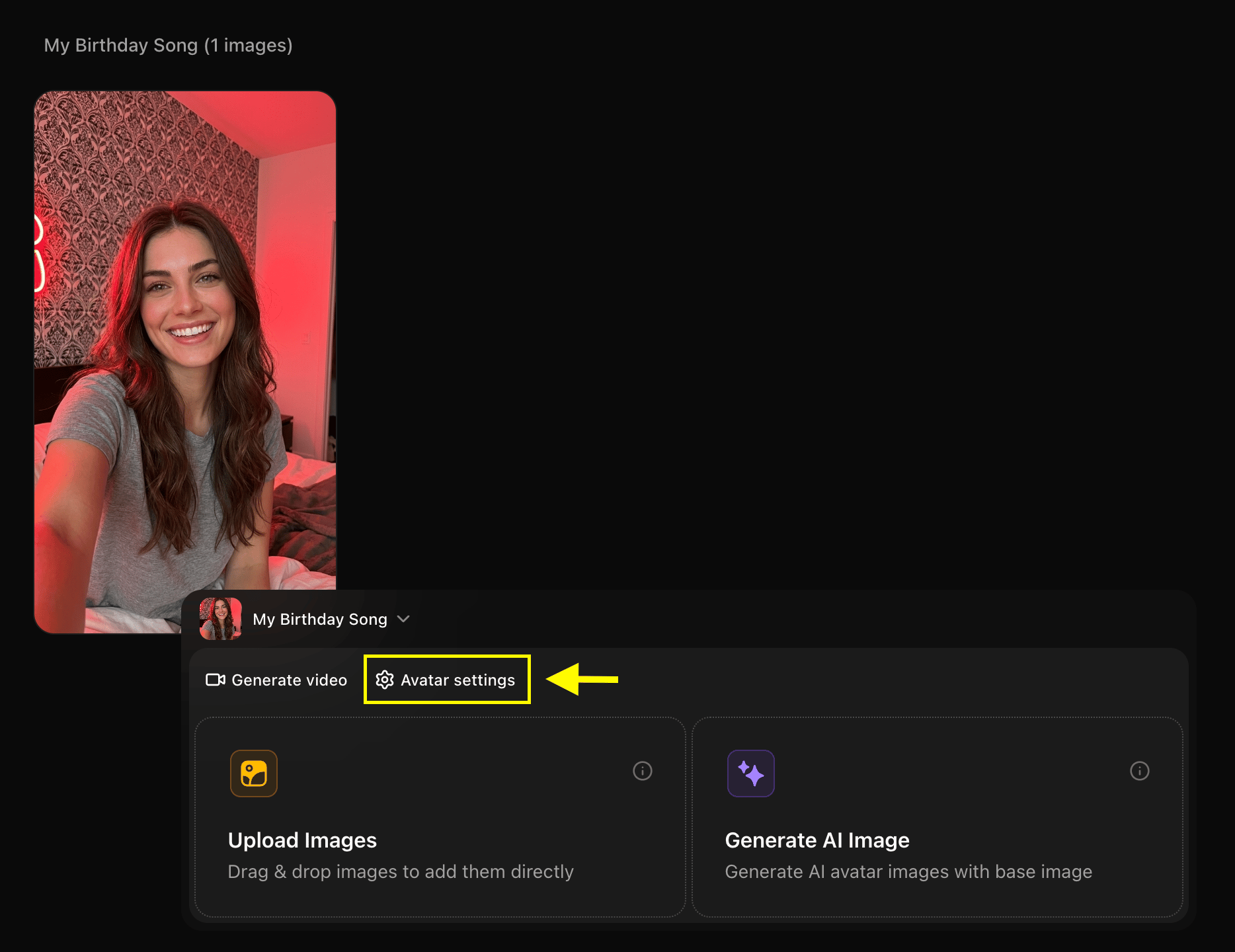
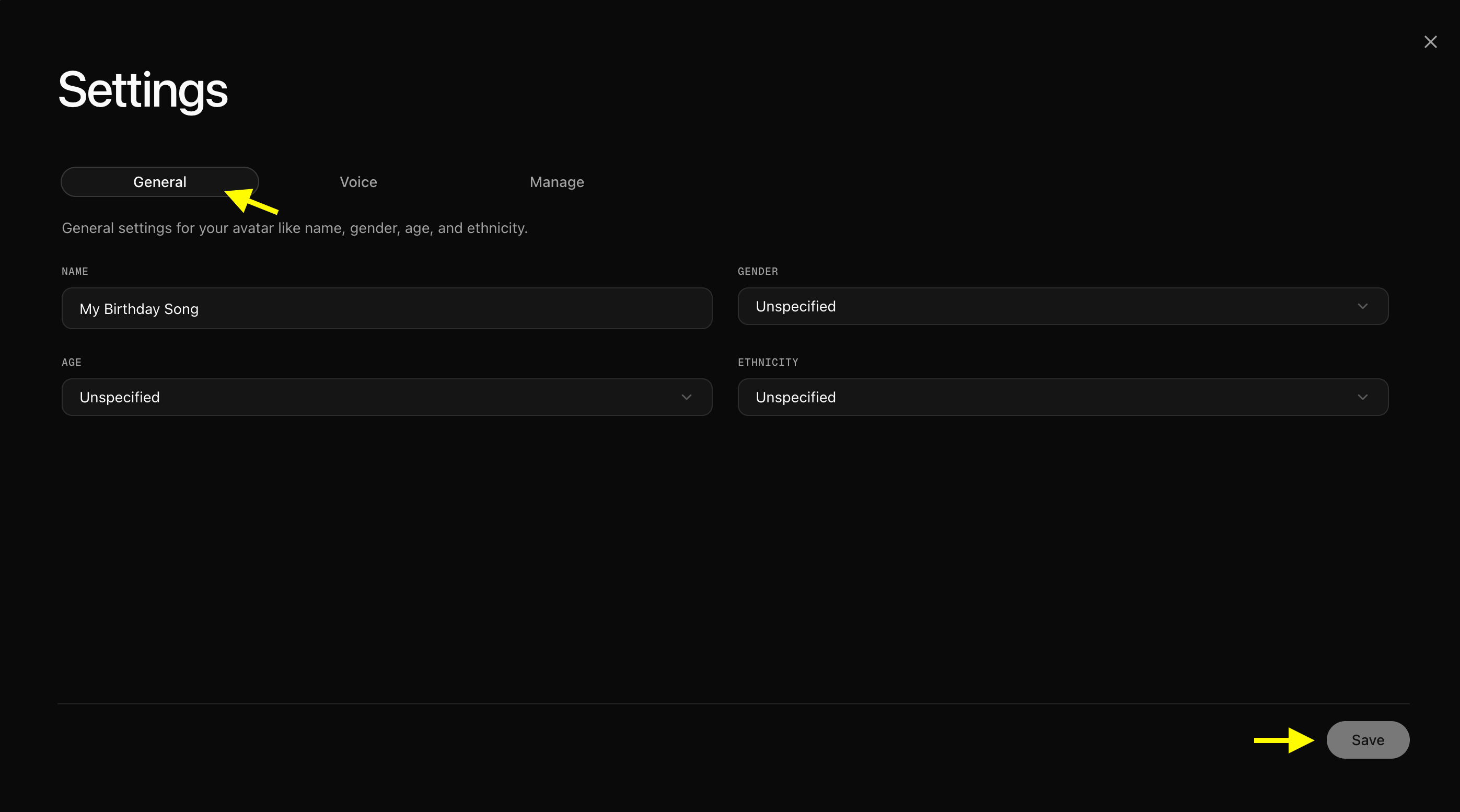
Click the **Avatar settings** tab next to **Generate video** to open the customization window. Under the **General** tab, you can add and refine details such as Name, Gender, Age, and Ethnicity. Once configured, click the **Save** button in the bottom-right corner.
### Step 6: Configure Profile Details
Click the **Avatar settings** tab next to **Generate video** to open the customization window. Under the **General** tab, you can add and refine details such as Name, Gender, Age, and Ethnicity. Once configured, click the **Save** button in the bottom-right corner.
 * **Fill in avatar settings gerneral information**
 ### Step 7: Select Generate Video Option
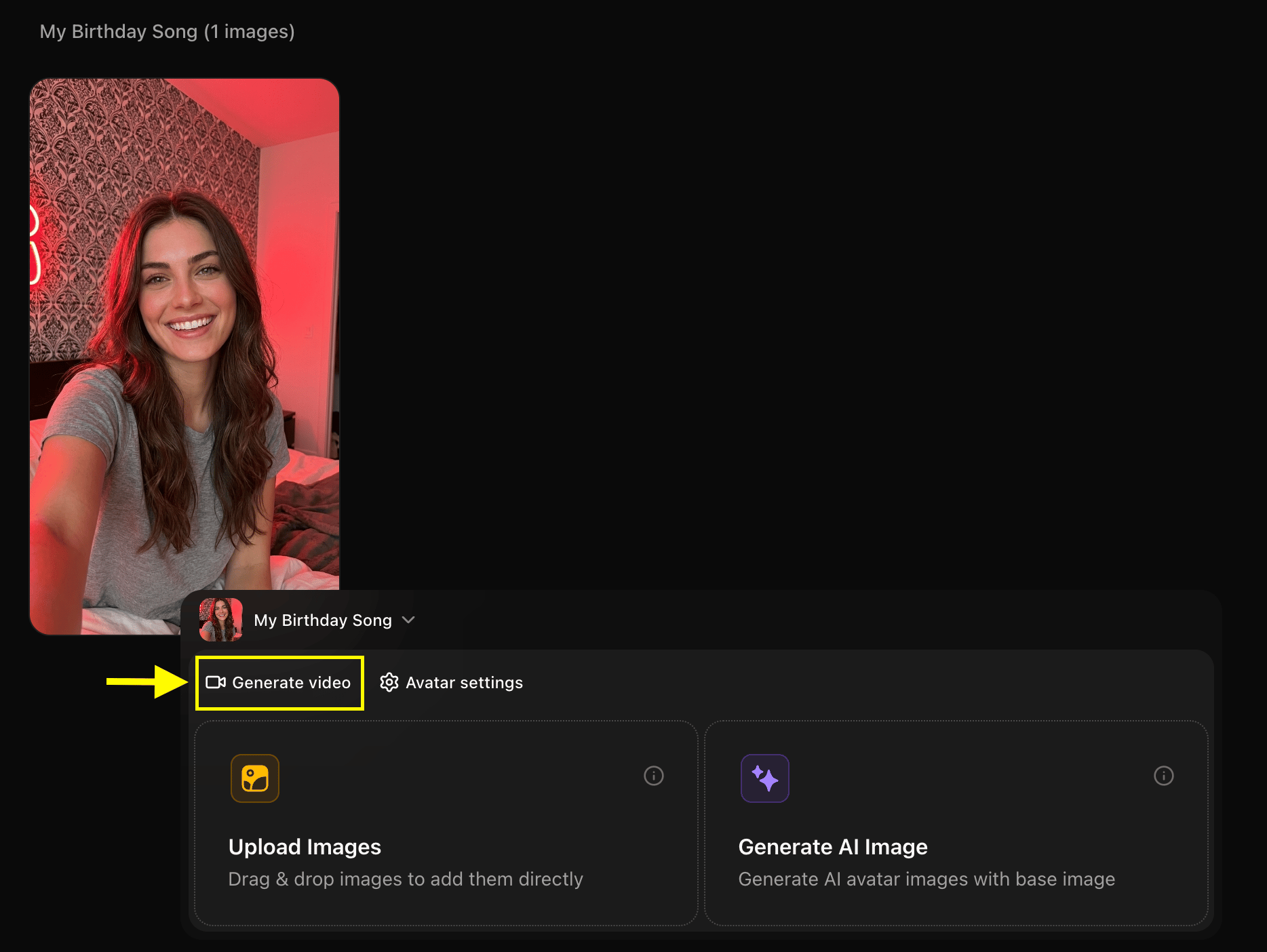
With your newly created profile selected, click the **Generate Video** button to open the editor timeline.
### Step 7: Select Generate Video Option
With your newly created profile selected, click the **Generate Video** button to open the editor timeline.
 ### Step 8: Choose Generate from Audio Option
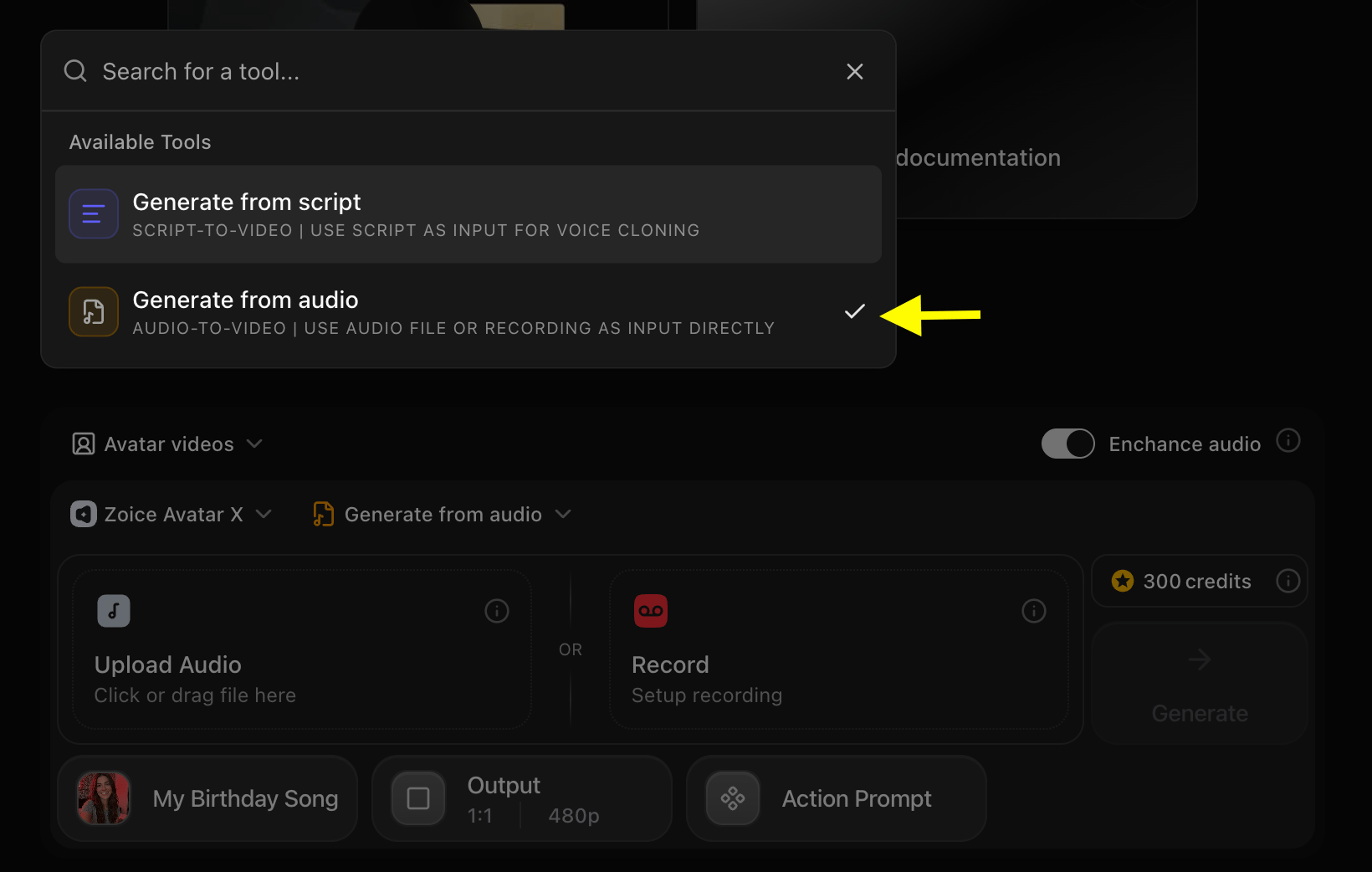
Toggle the dropdown menu from **Generate from script** to **Generate from audio**.
* **Select Generate from Audio**
### Step 8: Choose Generate from Audio Option
Toggle the dropdown menu from **Generate from script** to **Generate from audio**.
* **Select Generate from Audio**
 ### Step 9: Upload Your Birthday Song Track
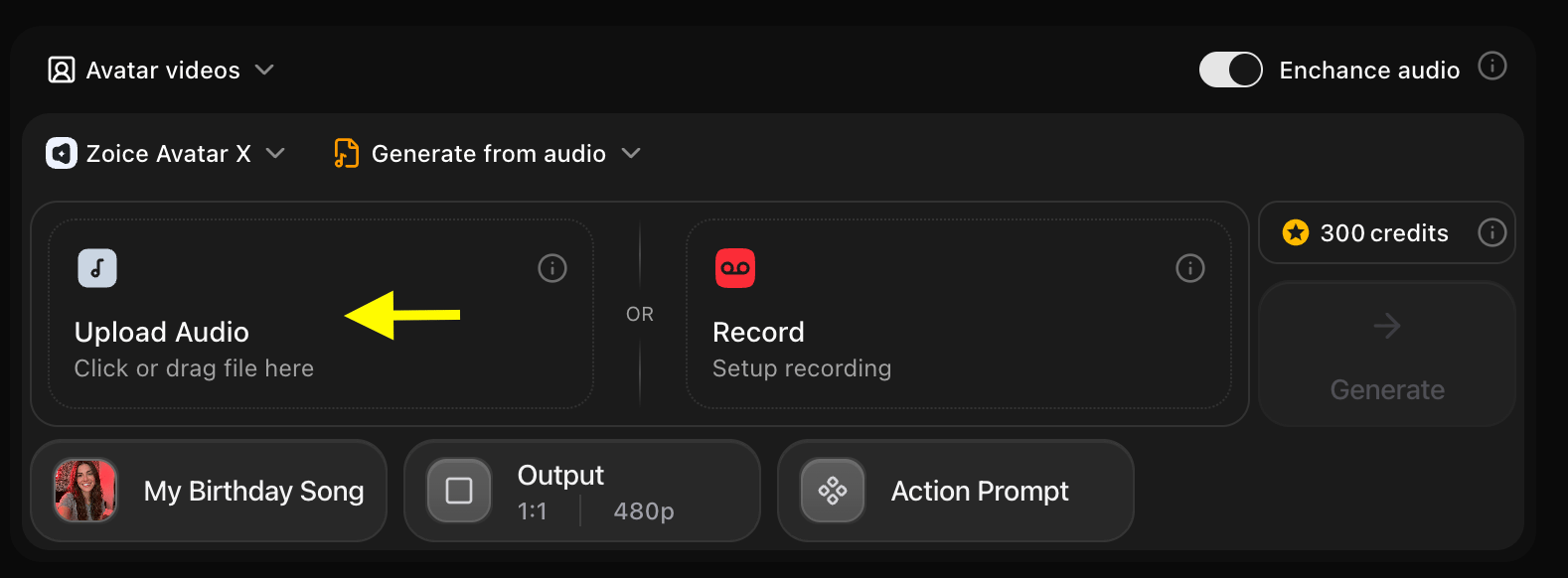
Click the **Upload Audio** box (indicated by the yellow arrow) to upload or drag-and-drop your birthday song file (MP3, WAV, or M4A format) from your local device.
### Step 9: Upload Your Birthday Song Track
Click the **Upload Audio** box (indicated by the yellow arrow) to upload or drag-and-drop your birthday song file (MP3, WAV, or M4A format) from your local device.
 ### Step 10: Playback Your Audio
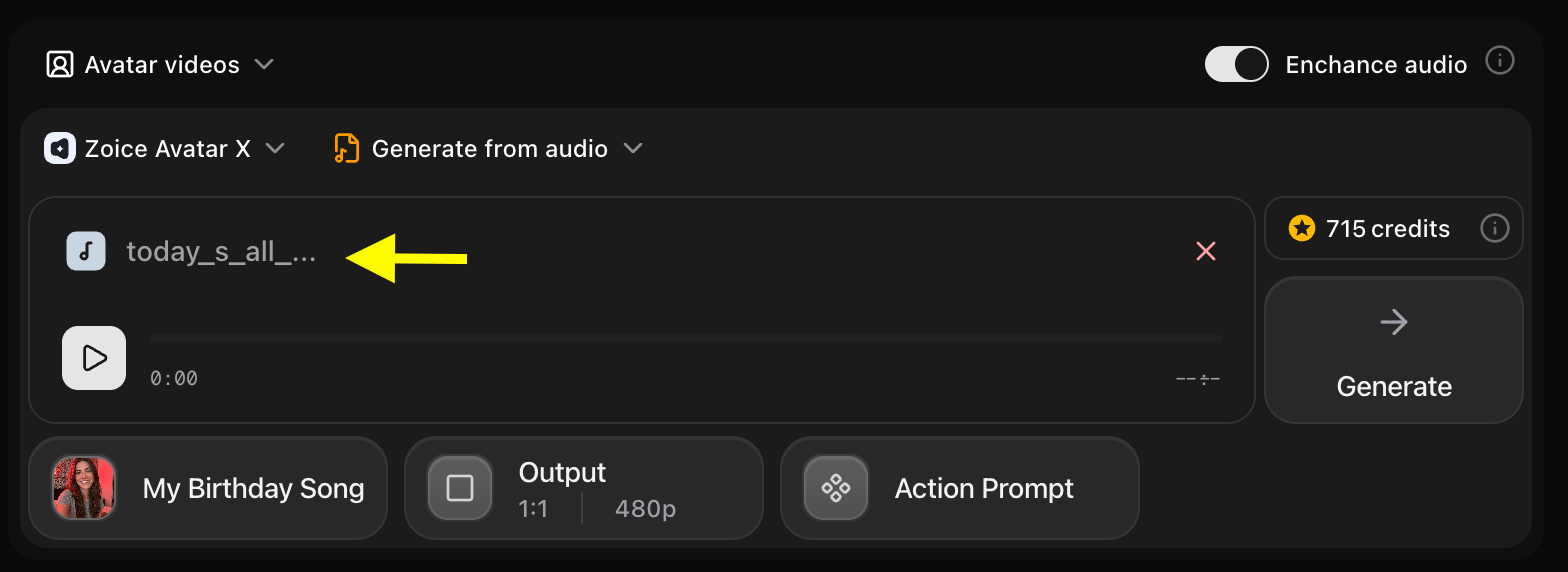
Once the track is successfully uploaded, you will see the file name inside the box (indicated by the yellow arrow). Click the **Play** button on the left of the timeline to preview your audio and ensure it plays correctly.
### Step 10: Playback Your Audio
Once the track is successfully uploaded, you will see the file name inside the box (indicated by the yellow arrow). Click the **Play** button on the left of the timeline to preview your audio and ensure it plays correctly.
 ### Step 11: Set Video Aspect Ratio
Select the **9:16 ratio** for a standard portrait video format, suitable for mobile cards (TikTok, WhatsApp Status, Instagram Reels).
### Step 11: Set Video Aspect Ratio
Select the **9:16 ratio** for a standard portrait video format, suitable for mobile cards (TikTok, WhatsApp Status, Instagram Reels).
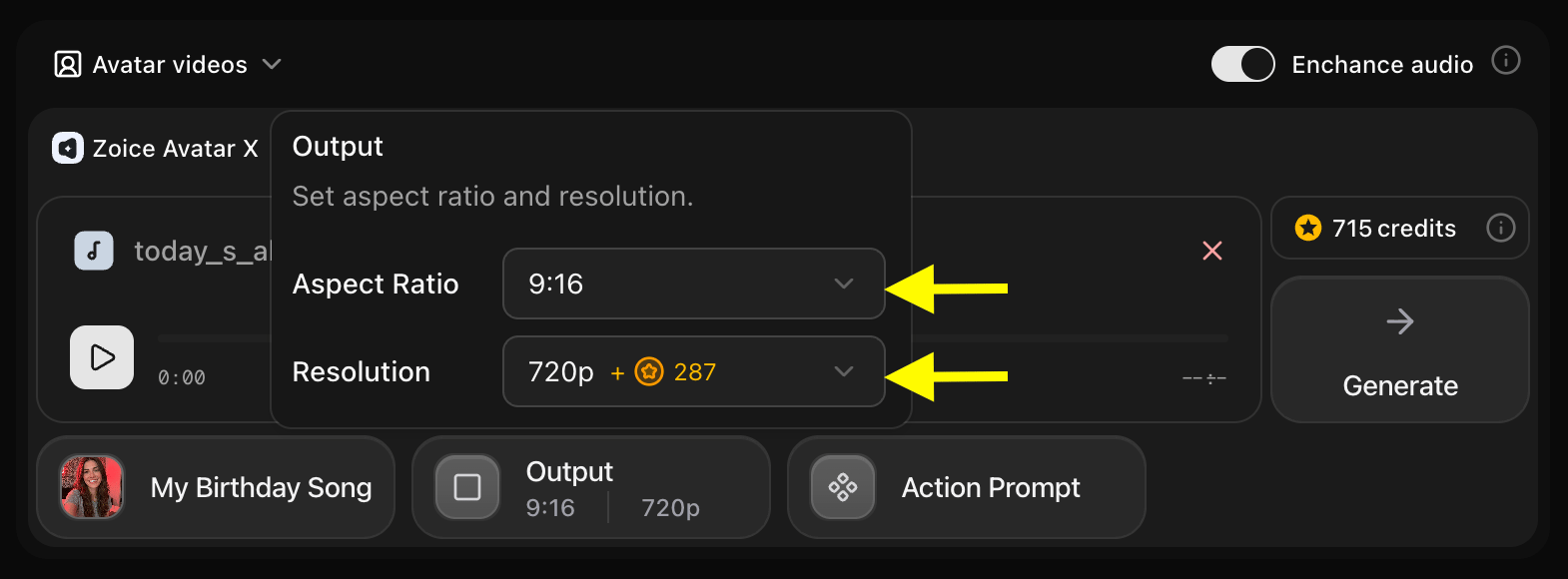 ### Step 12: Add an Action Prompt
Click the **Action Prompt** button to choose how the birthday subject behaves while performing the song.
### Step 12: Add an Action Prompt
Click the **Action Prompt** button to choose how the birthday subject behaves while performing the song.
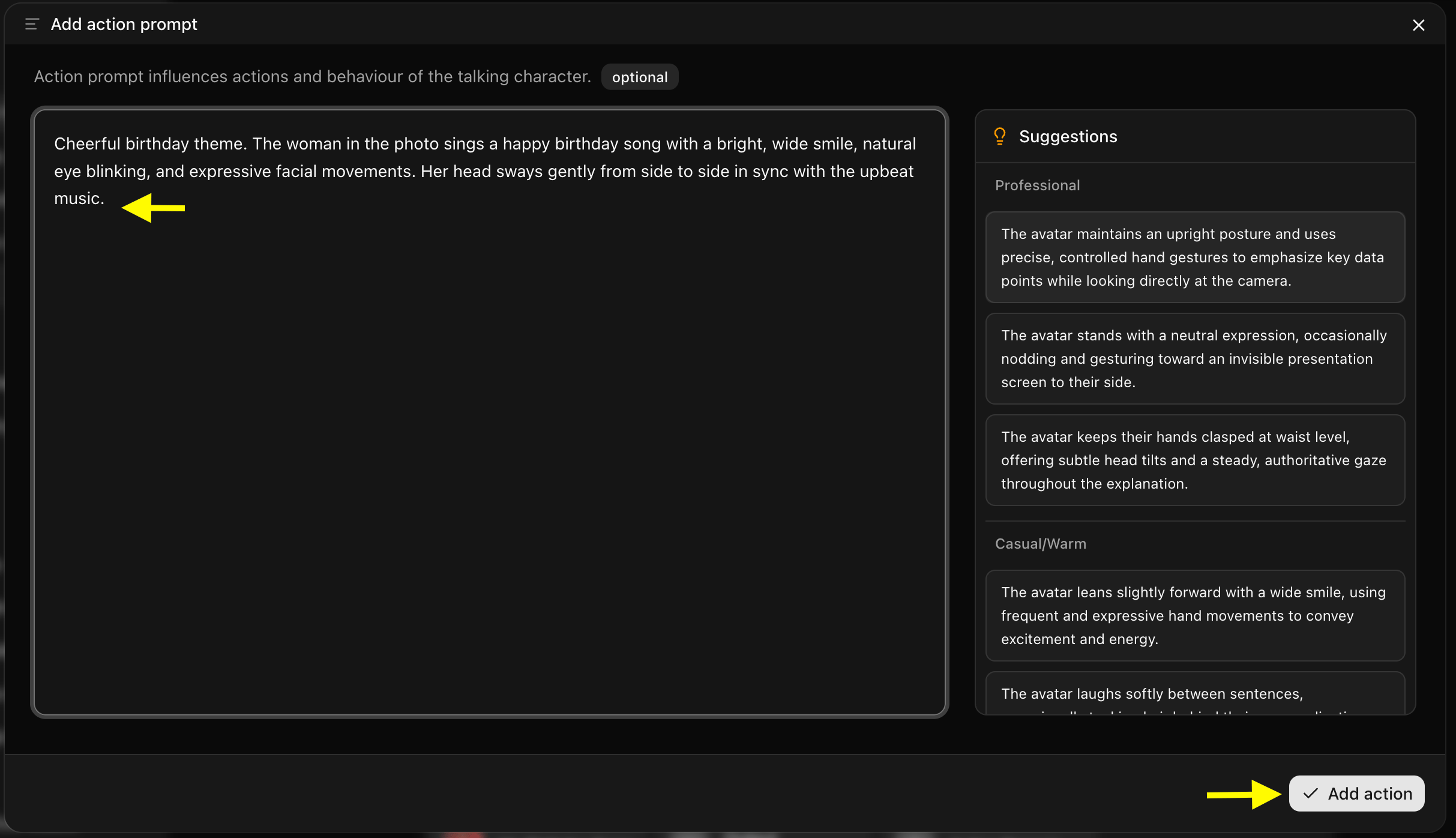
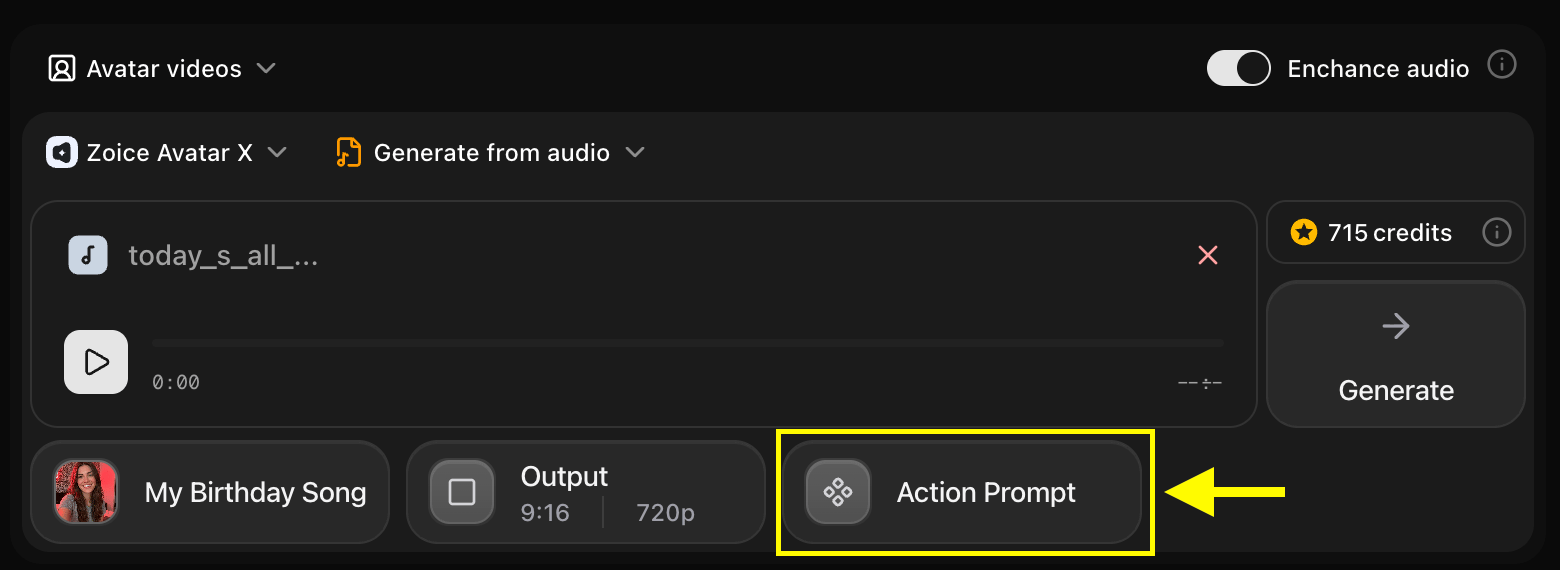 ### Step 13: Write a Happy Performance Instruction
Input a description of the desired behavior (e.g., *"Cheerful facial expressions, big smile, laughing, nodding happily in a party setting"*).
### Step 13: Write a Happy Performance Instruction
Input a description of the desired behavior (e.g., *"Cheerful facial expressions, big smile, laughing, nodding happily in a party setting"*).
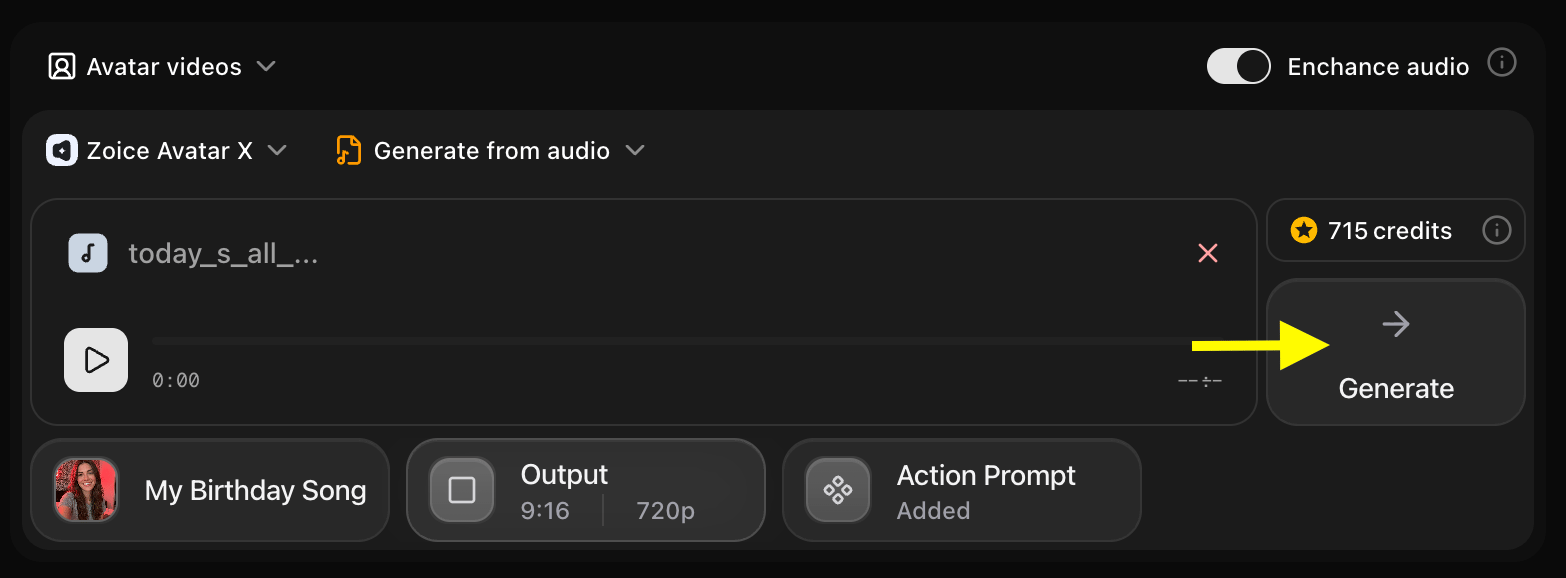
 ### Step 14: Click Generate to Begin
Review your settings and click the **Generate** button to send your task to the processing queue.
### Step 14: Click Generate to Begin
Review your settings and click the **Generate** button to send your task to the processing queue.
 ### Step 15: Confirm the Audio Preview
Listen to the audio preview to check the vocal sync. If everything sounds perfect, click **Generate Avatar Video** to render the final animation.
### Step 15: Confirm the Audio Preview
Listen to the audio preview to check the vocal sync. If everything sounds perfect, click **Generate Avatar Video** to render the final animation.
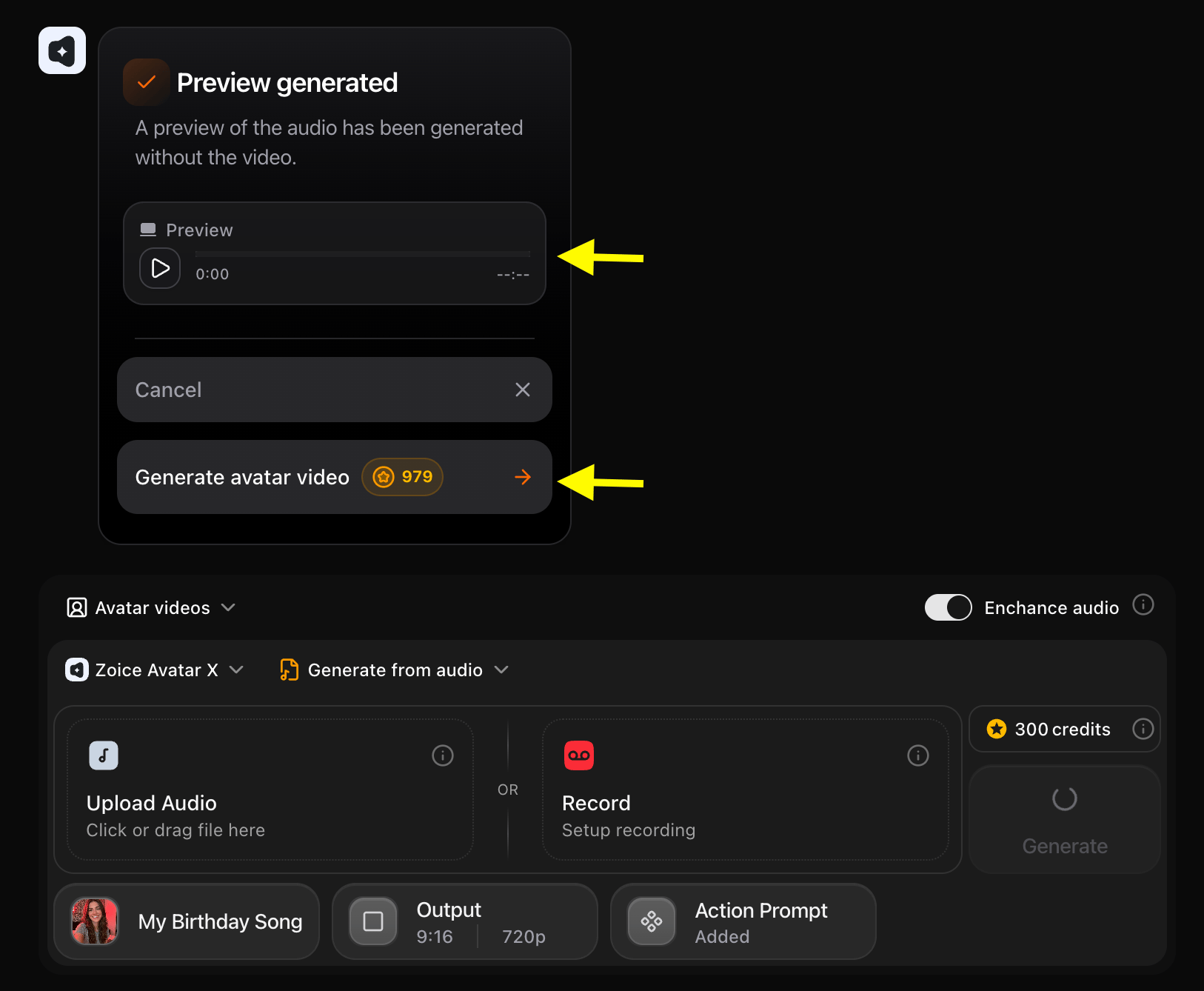 ### Step 16: Download the Birthday Video
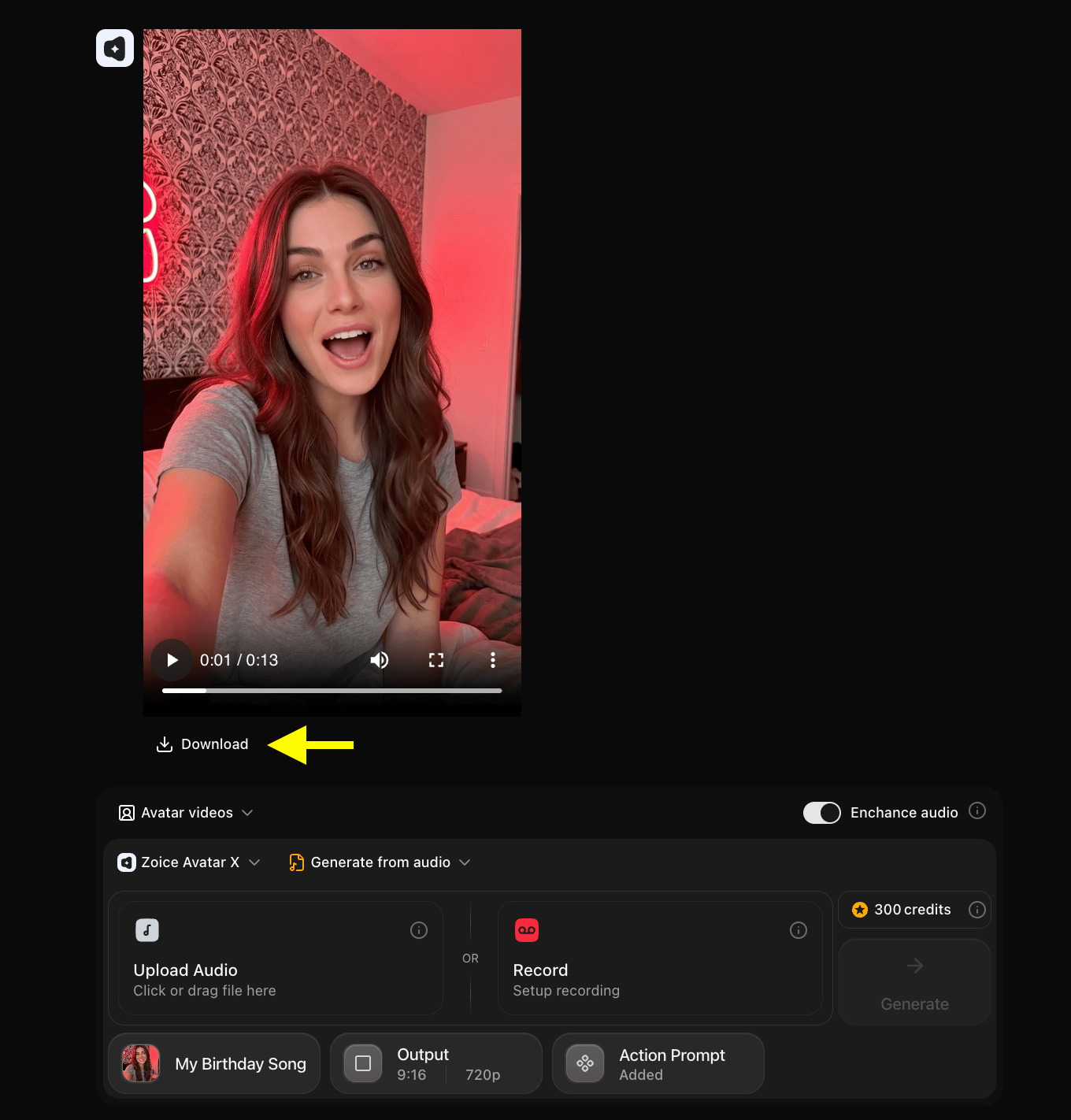
Once processing is complete, click **Download** to save the MP4 video to your device. It is now ready to send via chat, email, or post on social channels.
### Step 16: Download the Birthday Video
Once processing is complete, click **Download** to save the MP4 video to your device. It is now ready to send via chat, email, or post on social channels.
 > \[!NOTE]
> **Adding Background Music**: Zoice generates the lip-synced vocal performance video without background music tracks. To add background music or instrumental tracks to your birthday video, open any video editor (such as CapCut, Premiere Pro, or Canva), import your generated Zoice avatar video, and add your music track as an additional audio layer.
## Sample Inputs & Output
Here is a look at how to make ai birthday song video with photo:
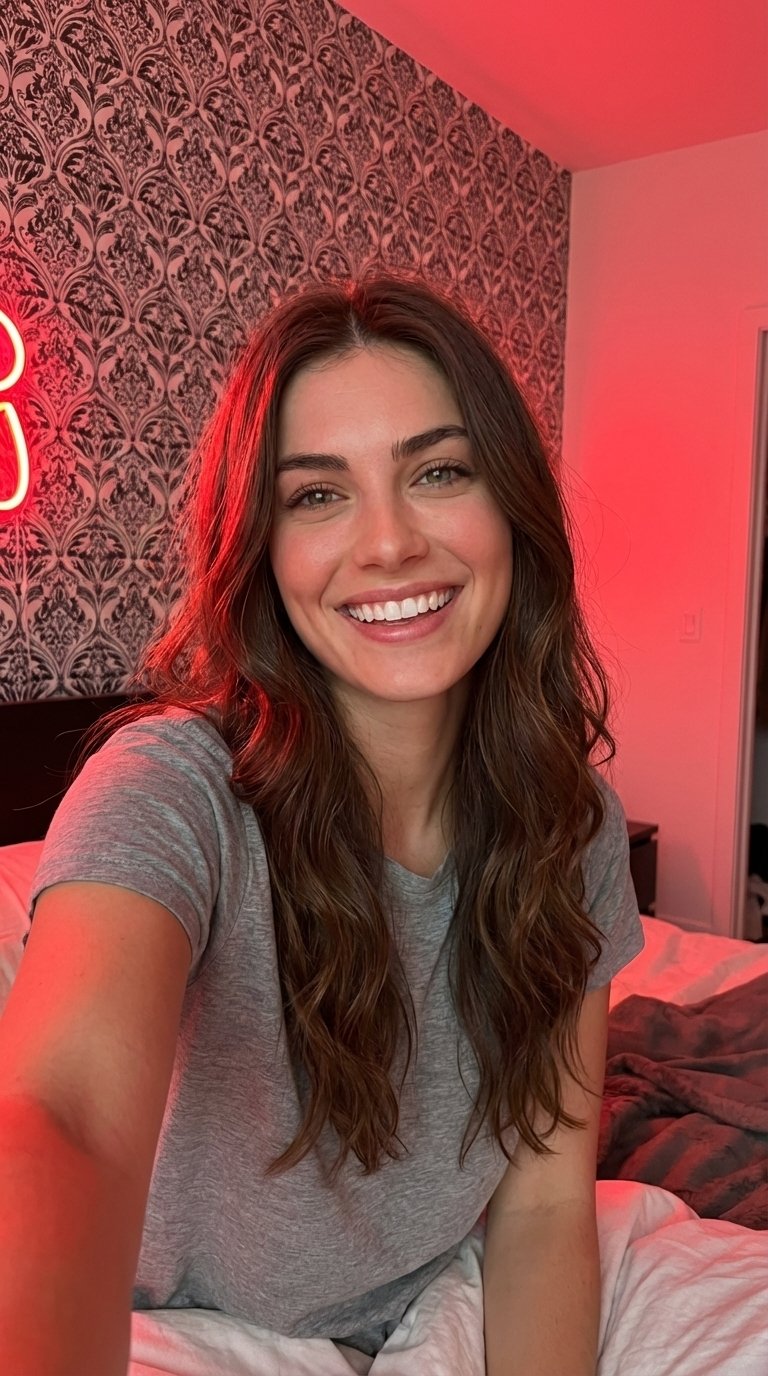
### Source Image
> \[!NOTE]
> **Adding Background Music**: Zoice generates the lip-synced vocal performance video without background music tracks. To add background music or instrumental tracks to your birthday video, open any video editor (such as CapCut, Premiere Pro, or Canva), import your generated Zoice avatar video, and add your music track as an additional audio layer.
## Sample Inputs & Output
Here is a look at how to make ai birthday song video with photo:
### Source Image
 ### Audio Track
[🎵 Listen to the birthday song sample](/images/birthday-photo-used-voice.mp3)
### Used Action Prompt
```
Cheerful birthday theme. The woman in the photo sings a happy birthday song with a bright, wide smile, natural eye blinking, and expressive facial movements. Her head sways gently from side to side in sync with the upbeat music.
```
### Output Result Video
Below is the completed birthday card rendering:
## Tips for Creating Better AI Birthday Song Videos
To get the highest quality results when you make ai birthday song video with photo, apply these creation tips:
* **Choose Happy Portraits**: Select clear, front-facing images of your friend or family member with cheerful facial lighting so the lip sync matches their expression.
* **Customize Action Prompts**: Add expressive terms like "wide smile", "laughing eyes", or "winking dynamically" to make the birthday greeting feel festive.
* **Select Upbeat Songs**: Pick high-quality birthday vocal tracks or recordings, and toggle the Enhance Audio feature for clear sound.
## AI Birthday Song Videos Can Be Used For?
Personalized birthday greetings are perfect for various celebrations:
* **Surprising Loved Ones**: Create customized singing video greetings for close friends, relatives, and parents.
* **Pet Celebrations**: Make funny clips of your family dog or cat singing the happy birthday song.
* **Co-Worker Celebrations**: Share a lighthearted, animated team greeting on corporate messaging channels.
* **Birthday Invitations**: Animate a character to sing and invite guests to your upcoming celebration.
## Where AI Birthday Song Videos Are Used?
These fun birthday videos are widely shared across messaging and social feeds:
* **Instant Messaging**: Sent directly via WhatsApp, iMessage, Messenger, or WeChat to surprise the celebrant.
* **Social Stories**: Shared on Instagram Stories, Facebook status updates, or TikTok feeds.
* **Email Greetings**: Sent as interactive virtual birthday card attachments.
## Final Words
Learning how to make ai birthday song video with photo with Zoice is an incredibly rewarding and straightforward process. By combining a happy portrait photo with a high-quality birthday vocal audio file, you can generate memories and musical legacy videos in just a few minutes.
### Audio Track
[🎵 Listen to the birthday song sample](/images/birthday-photo-used-voice.mp3)
### Used Action Prompt
```
Cheerful birthday theme. The woman in the photo sings a happy birthday song with a bright, wide smile, natural eye blinking, and expressive facial movements. Her head sways gently from side to side in sync with the upbeat music.
```
### Output Result Video
Below is the completed birthday card rendering:
## Tips for Creating Better AI Birthday Song Videos
To get the highest quality results when you make ai birthday song video with photo, apply these creation tips:
* **Choose Happy Portraits**: Select clear, front-facing images of your friend or family member with cheerful facial lighting so the lip sync matches their expression.
* **Customize Action Prompts**: Add expressive terms like "wide smile", "laughing eyes", or "winking dynamically" to make the birthday greeting feel festive.
* **Select Upbeat Songs**: Pick high-quality birthday vocal tracks or recordings, and toggle the Enhance Audio feature for clear sound.
## AI Birthday Song Videos Can Be Used For?
Personalized birthday greetings are perfect for various celebrations:
* **Surprising Loved Ones**: Create customized singing video greetings for close friends, relatives, and parents.
* **Pet Celebrations**: Make funny clips of your family dog or cat singing the happy birthday song.
* **Co-Worker Celebrations**: Share a lighthearted, animated team greeting on corporate messaging channels.
* **Birthday Invitations**: Animate a character to sing and invite guests to your upcoming celebration.
## Where AI Birthday Song Videos Are Used?
These fun birthday videos are widely shared across messaging and social feeds:
* **Instant Messaging**: Sent directly via WhatsApp, iMessage, Messenger, or WeChat to surprise the celebrant.
* **Social Stories**: Shared on Instagram Stories, Facebook status updates, or TikTok feeds.
* **Email Greetings**: Sent as interactive virtual birthday card attachments.
## Final Words
Learning how to make ai birthday song video with photo with Zoice is an incredibly rewarding and straightforward process. By combining a happy portrait photo with a high-quality birthday vocal audio file, you can generate memories and musical legacy videos in just a few minutes.